Google Launches Android Motion Assist to Combat Motion Sickness
Google's new Motion Assist feature brings moving shapes to Android screens to help passengers reduce motion sickness.
 Radwan AbdulhadiEditor and technology writer

Understanding Android's Motion Assist
Google has officially rolled out its answer to Apple's Vehicle Motion Cues, introducing a new capability called Motion Assist for Android users. If you are prone to getting carsick, looking at a mobile screen while riding in a car typically causes discomfort. However, with Motion Assist enabled, Android users have a better chance of scrolling without experiencing motion sickness.
Although Apple originally unveiled its version back in 2024 as part of iOS 18, the feature has now made its official transition to Android devices. It can be found on devices running Android 17 or higher alongside updated Google Play Services. Users who recently acquired any of the new Pixel 11 models can test the functionality out anytime, while Samsung users must ensure their devices are running One UI 9.
For phone brands outside of Google's Pixel lineup, the menu structure may vary, though searching for "Motion Assist" directly within device settings serves as a reliable path to the option.

How Motion Sickness and Motion Assist Interact
Motion sickness fundamentally stems from a conflict of the senses. When a person rides inside a car, their inner ear tracks every single turn, stop, and sudden burst of acceleration, signaling to the brain that movement is occurring. When a passenger's eyes remain locked onto a static phone screen, the brain receives conflicting signals because the eyes indicate that the body is entirely still.
This sensory imbalance leaves individuals feeling nauseous, and it represents the exact conflict that Google designed its new feature to resolve. By leveraging a device's built-in motion sensors, small shapes on the screen move around in response to the vehicle's maneuvers.
Google notes that this system helps the brain synchronize what the eyes see with what the body physically feels. While these shapes hover and shift in real time, they remain anchored to the edges of the display, keeping whatever content the user is reading or watching in the middle completely unobscured. Google emphasizes that the feature is strictly intended for passengers and should never be used while driving.

Setting Up and Automating Motion Assist
Activating Motion Assist on supported devices is straightforward. On Pixel smartphones, users navigate to the Settings app, tap their profile, and select All services. From there, Motion Assist can be toggled on directly within the Personal & device safety menu.
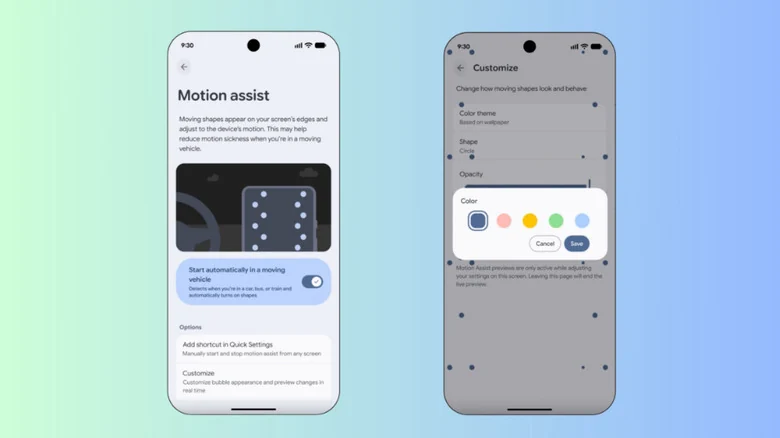
To prevent motion sickness proactively on future rides, users can configure their settings to turn on Motion Assist automatically whenever the phone senses it is inside a moving vehicle. Within the Motion Assist configuration menu, turning on the option to start automatically in a moving vehicle handles this process.
Because motion sensors can occasionally struggle to detect precisely when a car is moving, Google recommends adding the feature to the Quick Settings menu to ensure it is always accessible within a couple of taps.
Customization Options for Screen Shapes
Similar to Apple's approach, Google allows users to customize the colors, opacity, and shapes that appear on screen when Motion Assist is active. This flexibility lets users fine-tune the visual elements according to their preferences.
These adjustments are accessed through a dedicated Customize menu found within the main Motion Assist settings. Furthermore, a randomization option is available to automatically change the colors and shapes while the feature is in use.
Sources
- EngadgetHow to use Android's Motion Assist feature to help with motion sickness
Continue chronologically
Related entity coverage
Related stories
How to Block and Unblock Numbers on Your Android Phone
Tired of spam? Learn how to effectively manage your block list on Android phones, including specific steps for Samsung and Google Pixel devices.
Google Pixel Marks Its 10th Anniversary
Google celebrates the tenth anniversary of the Pixel smartphone line, reflecting on a decade of evolution, hardware changes, and ecosystem expansion.
Google's Googlebooks Aim to Bridge Android Phones and Laptops
Google's first Googlebooks go on pre-order October 4, promising deeper Android phone integration, AI tools, and a new Android-based foundation.
Google Launches Googlebook Laptops for Android Users
Google has officially unveiled Googlebooks, a new line of laptops designed to provide seamless connectivity and synergy with your Android smartphone.