How to Check Your PC CPU Temperature and Prevent Overheating
Monitoring your computer's CPU temperature is an essential part of maintaining system health, especially as replacement hardware costs continue to rise.
 Radwan AbdulhadiEditor and technology writer
Understanding CPU Temperatures and System Health
The temperature of a computer's CPU is often overlooked until something goes wrong with the system. This tiny chip handles everyday computing tasks, from running multiple browser tabs to editing photos and playing video games smoothly. However, if a PC suddenly becomes sluggish or starts to sound like a jet engine, it may be overheating due to thermal stress.
Fortunately, a CPU's temperature can fluctuate for various reasons, and several free utilities are available to help users monitor hardware health. Maintaining awareness of thermal performance can help prevent unexpected system crashes and prolong the longevity of vital components.
Free Tools to Check Your CPU Temperature
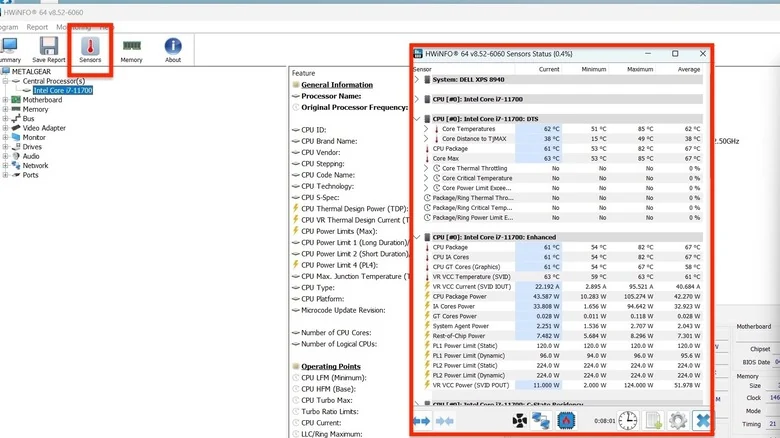
One of the most comprehensive tools available for checking processor temperatures is HWiNFO, a free diagnostic utility that supplies real-time data on PC and laptop hardware. After installation, users can open the program and select the Sensors tab to view detailed temperature readings in Celsius.
Alternative free applications like Core Temp and HWMonitor provide similar monitoring capabilities. Running these diagnostic tools during various workloads—such as launching a game or video editing software—allows users to observe how processor temperatures change between idle and heavy-load conditions.
Interpreting CPU Temperature Readings
While exact thermal thresholds vary depending on the specific processor model, an average running temperature of 60 degrees Celsius or below is generally considered a healthy baseline for routine daily tasks. When a CPU consistently hovers between 70 and 90 degrees Celsius, users should investigate the cause to prevent long-term complications.
Temperatures reaching 90 degrees Celsius and above indicate severe overheating, which can shorten the lifespan of the processor. Modern chips often mitigate this risk by engaging thermal throttling as a way of protecting itself, which drastically reduces performance and slows down the PC.
If performance throttling fails to cool the processor down adequately, users may encounter system freezing and unexpected crashes. For precise temperature ranges and overclocking guidance, checking specifications directly with the original hardware manufacturer is recommended.
Troubleshooting and Fixing High CPU Temperatures
When a processor runs hotter than normal, several troubleshooting steps can help bring temperatures down. Checking the Windows Task Manager to identify and close resource-heavy applications can instantly relieve processing strain caused by rogue background software.
If software solutions do not lower the temperature, dust accumulation inside the computer case may be restricting airflow. Users can open their towers and use a can of compressed air to clear out dust from fans and components, as well as clean removable dust filters to improve the airflow.
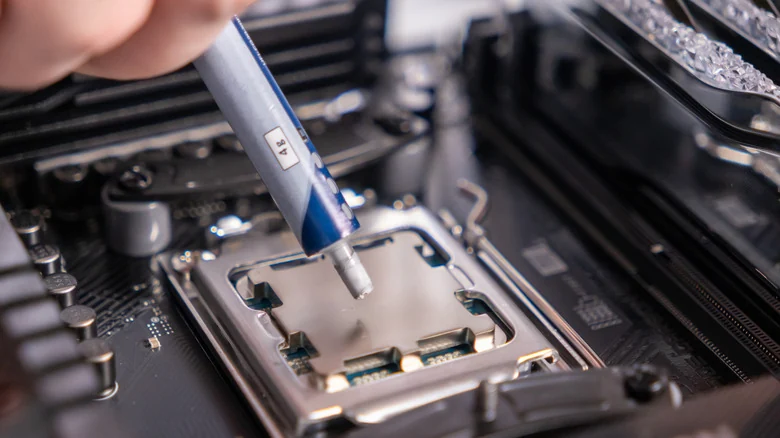
Another potential fix involves replacing dried thermal paste, which sits between the CPU and its heatsink to assist with heat dissipation. While this process requires temporarily removing the cooling hardware, following a reliable guide makes it an approachable maintenance task.
Protecting Hardware Investments Amid Rising Costs
Monitoring thermal performance is increasingly important given current market conditions. The prices of PCs, laptops, and individual components such as CPUs, GPUs, RAM, and storage have climbed significantly. Chip makers like AMD and Intel have raised prices and signaled potential future increases, making proactive electronics maintenance a practical way to avoid expensive hardware replacements.
Sources
- EngadgetHow to check the temperature of your PC's CPU
Continue chronologically

Related stories
Gears of War E-Day Pushes Unreal Engine 5 CPU Limits
An in-depth benchmark of 25 Intel and AMD processors reveals that Gears of War E-Day is an uncharacteristically CPU-heavy Unreal Engine 5 title.

AMD Surpasses $1 Trillion Market Cap Milestone
AMD has officially joined the elite trillion-dollar market cap club, outpacing Intel following a significant surge in stock price fueled by data center demand.

How to Turn Your Old Windows PC Into a Chromebook for Free
Don't discard your aging hardware. Learn how to repurpose your old Windows or Mac computer by installing ChromeOS Flex for a lightweight and secure experience.

Leaked Intel Nova Lake Product List Features Three 'BFC' Chips
A leaked SKU table for Intel's upcoming Nova Lake desktop processors reveals three 'BFC' models featuring up to 144MB of L3 cache and 28 cores.