Preview Web Apps Live With Amazon Bedrock AgentCore Runtime
A new capability from Amazon Bedrock lets developers watch web applications update live in their browsers while coding agents make changes.
 Radwan AbdulhadiEditor and technology writer
Introduction to Amazon Bedrock AgentCore Runtime
Coding agents have evolved to build functional web applications like dashboards, product pages, and early prototypes. The review loop works best when the target application remains running right where the coding agent edits it, enabling changes to show up in a browser within seconds. When an app must first be copied out and deployed elsewhere, every single change waits for a separate deployment cycle, slowing down the review process significantly.
To address this friction, Amazon Bedrock AgentCore offers a comprehensive platform designed to build, connect, and optimize agents at scale using a developer's choice of agent framework and foundation model. Specifically, the AgentCore runtime executes every individual agent session inside an isolated microVM, ensuring a secure and controlled execution environment for complex coding tasks.
Understanding Session Endpoints and Live Previews
Using Session endpoints, developers can directly open and interact with an application running inside an active agent session right from their local browser. These Session endpoints assign each runtime session a dedicated, authenticated URL that forwards requests—including HTTP methods, paths, query strings, bodies, and WebSocket connections—to the specific ports allowed by the configuration.
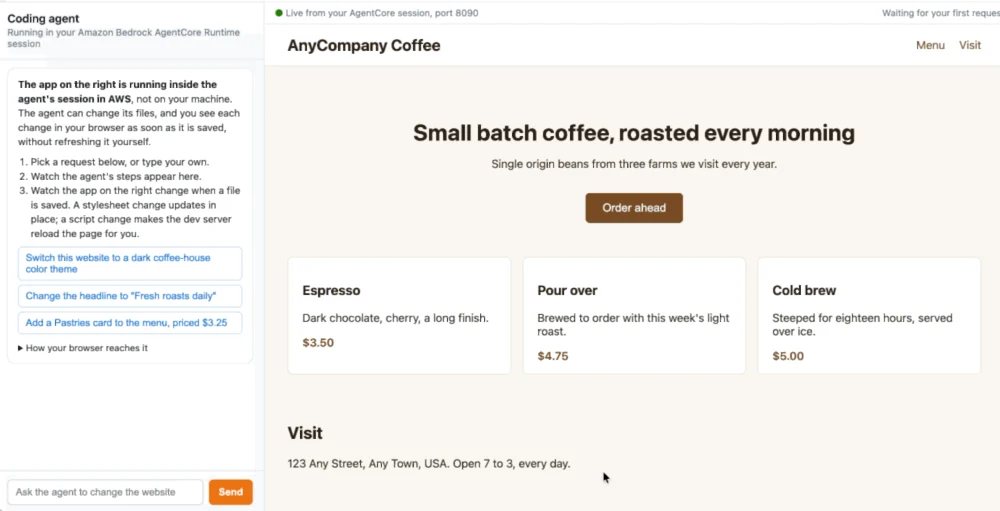
When deploying a coding agent that keeps a Vite website running inside its session, users can maintain a split workspace with a chat interface on one side and the live website preview on the other. Asking the agent to adjust styling themes or layout properties streams the steps directly into the chat while updating the website instantly without requiring a manual page refresh.
Configuring Ports and Session Endpoint Details
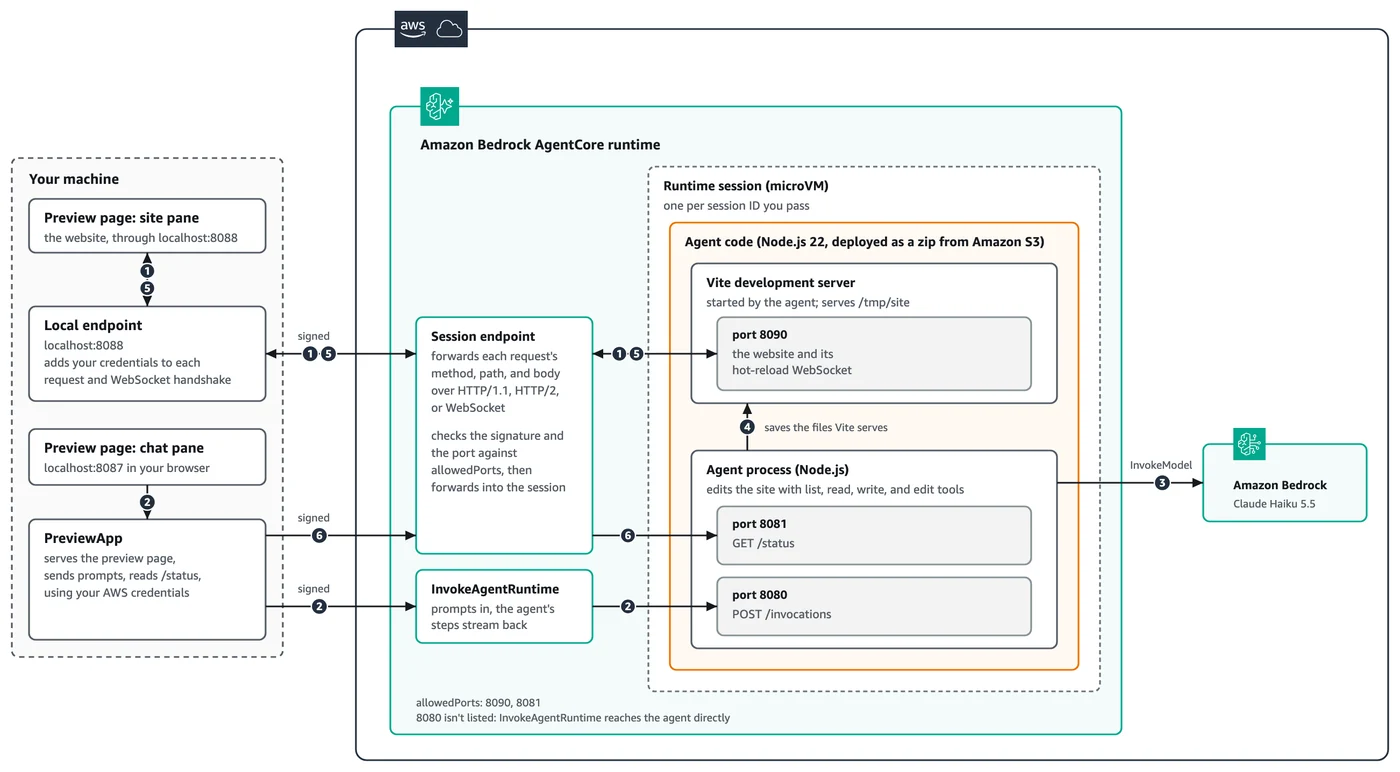
Each session receives its own unique Session endpoint, governed by six core configuration details that dictate how developers interact with the environment. First, developers explicitly choose which ports the endpoint reaches by configuring allowedPorts when executing CreateAgentRuntime. These settings allow between one and five entries, where each entry represents a single port or a designated range within ports 8000 through 12000, while excluding reserved platform ports.
The operational URL is delivered automatically alongside the session itself. Specifically, the InvokeAgentRuntime response carries this target URL inside the designated HTTP header, which software development kits map directly into convenient property structures for developer applications.
Security, Authentication, and Local Endpoints
Every single request made to a Session endpoint is rigorously authenticated. For runtimes relying on AWS Identity and Access Management (IAM), incoming HTTP requests, HTTP/2 streams, and WebSocket handshakes must carry valid Signature Version 4 signatures. Furthermore, callers require explicit authorization permissions on the runtime and its associated runtime endpoint.
Because standard web browsers cannot automatically attach cryptographic signatures or bearer tokens to outgoing page requests on their own, the Session endpoint client included within the SDK can establish a local endpoint directly on the developer's machine. The browser opens a local address while the local helper application injects the required credentials into each request and WebSocket handshake before forwarding traffic securely to the remote session.
Sample Walkthrough and Implementation Architecture
The complete reference architecture and sample notebooks can be found inside the 14-remote-access folder of the official agentcore-samples GitHub repository. In this reference setup, a coding agent runs inside the isolated microVM session on a designated port, utilizing tools to list, read, write, and edit website files.
The agent simultaneously launches a Vite development server to serve the website and immediately push saved edits to the browser via a hot-reload WebSocket connection. The local preview application orchestrates communication, passing user prompts to the agent runtime while receiving live visual updates through the secure Session endpoint architecture.
Sources
- AWS Machine Learning BlogPreview web apps live as your coding agent builds them with Amazon Bedrock AgentCore runtime
Continue chronologically


Related entity coverage
Related stories
Amazon Bedrock AgentCore Automates PowerPoint Generation
Learn how the new Amazon Bedrock AgentCore AI agent system automates PowerPoint presentation creation from enterprise documents in under 90 seconds.
Build Multi-Agent Pipelines with Amazon Bedrock AgentCore
Learn how to build a multi-agent music production pipeline on Amazon Bedrock AgentCore Runtime Instances using shared sessions and GPU infrastructure.
Building Agentic Retrieval on Amazon Bedrock with AWS CDK
Learn how to build enterprise agentic retrieval on a Managed Amazon Bedrock Knowledge Base using the AWS CDK and Amazon Bedrock AgentCore.
Building Context-Aware AI Assistants with AgentCore and OpenClaw
Learn how to build context-aware personal AI assistants using OpenClaw and Amazon Bedrock AgentCore runtime with durable, structured memory.