
Build Real-Time Voice Apps with vLLM-Omni on SageMaker AI
A new AWS tutorial demonstrates how to stream generated speech over a persistent bidirectional connection using the AWS vLLM-Omni Deep Learning Container and Amazon SageMaker AI.
 Radwan AbdulhadiEditor and technology writer
Introduction to vLLM-Omni and SageMaker AI
Voice agents, interactive learning applications, accessibility tools, and customer service assistants require immediate responses without long silent pauses. To address this challenge, developers can deploy a text-to-speech model on <a href="https://aws.amazon.com/sagemaker/ai/">Amazon SageMaker AI</a> that begins playing speech before completing the full response generation. This approach utilizes the <a href="https://aws.github.io/deep-learning-containers/vllm-omni/">AWS vLLM-Omni Deep Learning Container (DLC)</a> to deploy the Qwen3-TTS model, enabling text input and audio output over a single persistent bidirectional connection.
AWS provides deployment guidance and specialized Docker images for widely adopted serving frameworks. This release serves as Part 1 of a tutorial series focusing on specialized DLCs such as vLLM-Omni, WhisperX, and llama.cpp, targeting streamed speech for real-time voice applications. Part 2 of the series expands the usage of the vLLM-Omni DLC toward image and video generation workflows.
Multimodal Inference and vLLM-Omni Capabilities
Specialized inference runtimes support media pipelines and model architectures that diverge from traditional text generation. By packaging these runtimes with framework dependencies and configuration files, AWS Deep Learning Containers offer a consistent path to managed inference services and cloud compute infrastructure.
The vLLM-Omni project extends standard text generation capabilities to serve models capable of processing and generating text, audio, images, and video. Its heterogeneous pipeline abstraction coordinates multi-stage workflows, providing streaming outputs and OpenAI-compatible APIs. While the runtime supports automatic speech recognition, audio generation, and image production, this initial tutorial highlights the <a href="https://huggingface.co/Qwen/Qwen3-TTS-12Hz-1.7B-CustomVoice">Qwen3-TTS</a> model as a focused example for bidirectional audio output.
Bidirectional Streaming Architecture
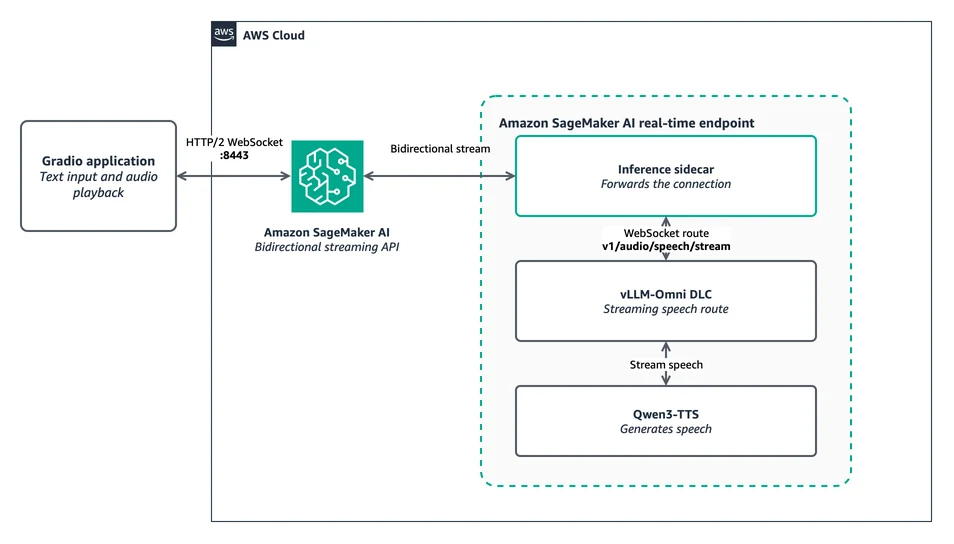
SageMaker bidirectional streaming relies on a full-duplex WebSocket transported over HTTP/2. Clients connect directly to the SageMaker Runtime endpoint on port 8443, where an inference sidecar forwards the connection to the native vLLM-Omni WebSocket route inside the underlying container.
During operation, session configurations and text events are sent to the endpoint, while audio lifecycle events and 24 kHz PCM chunks stream back over the same connection. The vLLM-Omni v1.5 DLC provides the necessary routing middleware and capability labels required by SageMaker AI, utilizing the native WebSocket route designed for streaming speech.
Endpoint Configuration and Instance Pools
Endpoint configurations within this deployment workflow utilize SageMaker instance pools. An instance pool establishes a priority-ordered list of compatible instance types for a single production variant. SageMaker attempts to provision the primary choice first before falling back to alternative instance options if compute capacity is unavailable.
When creating the endpoint, SageMaker validates quotas for every entry defined in the configured pool, meaning developers must ensure adequate account quota for all included types. Furthermore, hourly operational costs may shift if SageMaker selects a secondary instance type from the pool during provisioning.
Deployment and Setup Instructions
To begin building applications with this architecture, developers need an AWS account with configured CLI credentials, appropriate permissions to create SageMaker AI endpoints, and sufficient quota for at least one supported instance type, such as ml.g6.xlarge, ml.g6e.xlarge, ml.g5.xlarge, or ml.g4dn.xlarge.
The complete code sample is available in the hosting examples repository. Developers can clone the repository, install the necessary Python packages within a virtual environment, set the required execution role environment variables, and run the deployment script to initialize the real-time endpoint and execute a validation streaming smoke test.
Sources
- AWS Machine Learning BlogBuild real-time voice applications with vLLM-Omni on SageMaker AI – Part 1