
Generate Images and Video with vLLM-Omni on SageMaker AI
A new architectural approach combines real-time image generation and asynchronous video workflows utilizing a unified container image on Amazon SageMaker AI.
 Radwan AbdulhadiEditor and technology writer
Unified Generative Media Deployment
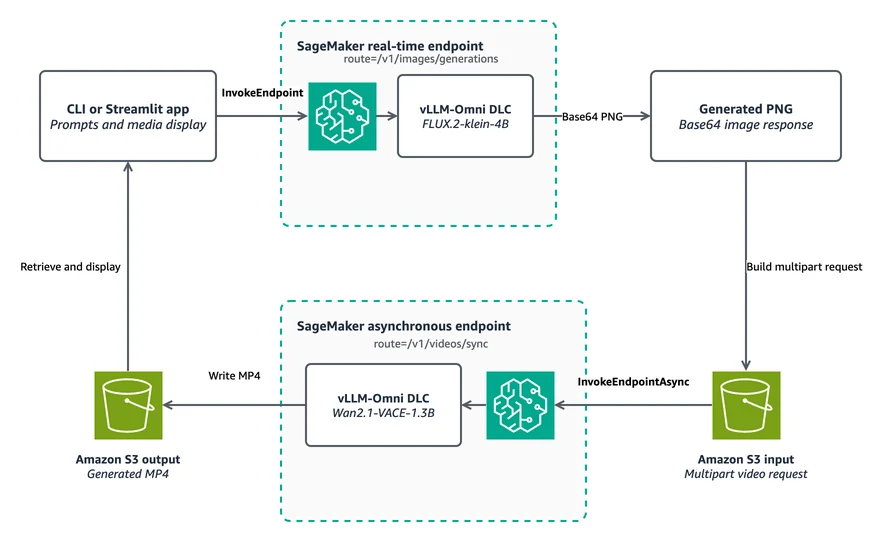
The AWS Machine Learning Blog detailed a comprehensive workflow to transform text prompts into still images and subsequently animate those images into short videos on Amazon SageMaker AI. Developers can deploy two separate endpoints utilizing the identical AWS vLLM-Omni Deep Learning Container (DLC). This unified setup includes a real-time endpoint dedicated to the FLUX.2-klein-4B image generation model and an asynchronous endpoint configured for the Wan2.1-VACE-1.3B video generation model.
AWS Deep Learning Containers package the necessary frameworks and underlying dependencies to streamline training and inference tasks across infrastructure. Specifically, the AWS vLLM-Omni DLC packages tracked vLLM-Omni releases alongside routing middleware tailored for SageMaker AI environments. Through OpenAI-compatible APIs, vLLM-Omni expands traditional text-generation capabilities to accommodate advanced media models that process or generate text, audio, images, and video.
Real-Time and Asynchronous Architecture
This publishing sequence builds upon earlier guides exploring specialized AWS DLCs. While previous content like Part 1 addressed bidirectional streaming for real-time speech, this second installment shifts focus to a combination of real-time and asynchronous inference patterns. The image model immediately returns results inline, whereas the computationally intensive video model writes its output securely to Amazon Simple Storage Service (Amazon S3).
By deploying a common container image across both endpoints, administrators minimize serving-stack variation. Concurrently, separating the endpoints permits each media model to leverage the precise instance type and inference configuration suited to its distinct workload. Real-time endpoints handle incoming requests for FLUX.2-klein by routing traffic directly to dedicated image generation paths, while asynchronous endpoints queue video tasks to balance heavy computational demands.
Workflow and Implementation Steps
Engineers can utilize an available code sample to replicate the deployment architecture. The provided repository includes both command-line utilities and a Streamlit application to evaluate the generation pipeline. After configuring an AWS account with proper CLI credentials and execution roles, users clone the hosting examples repository and install the specified Python dependencies.
The deployment script initializes the environment by pinning specific container releases and establishing both real-time image and asynchronous video endpoints. Environmental variables instruct each container on which specific model to load, while internal features such as variational autoencoder (VAE) tiling help mitigate peak memory constraints during complex video decoding processes.
Inference Execution and Request Routing
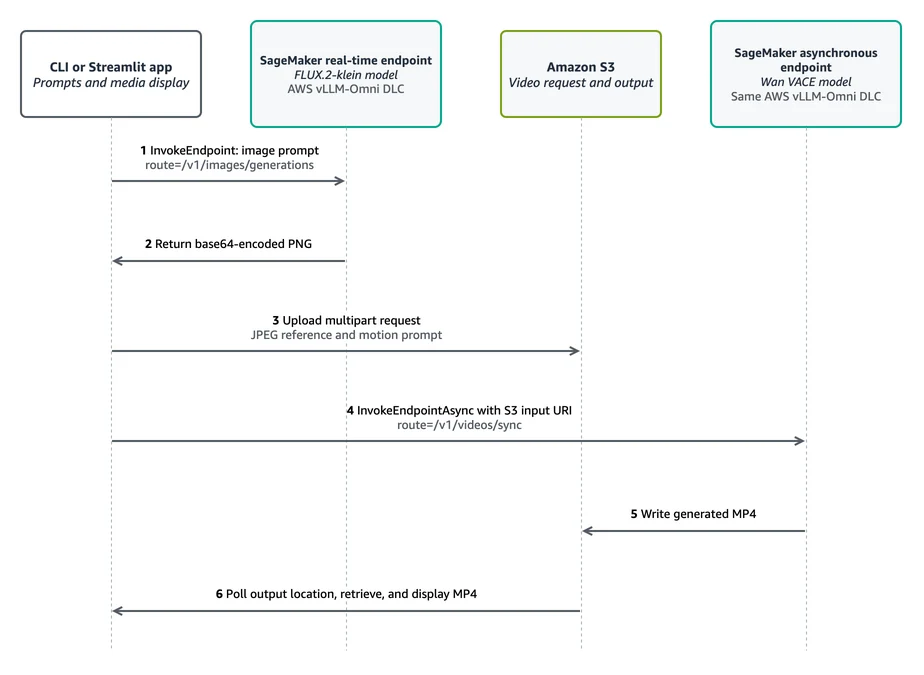
During operation, client applications send text prompts to the image generation endpoint to retrieve a base64-encoded PNG file. The workflow then resizes this image, translates it into a compact data reference, and embeds it into a multipart request sent to the asynchronous video endpoint. SageMaker Asynchronous Inference evaluates the input stored within Amazon S3 and eventually writes the finalized MP4 file back to the designated output storage location.
This architectural choice separates fast conversational responses from longer-running media computations, enabling clients to poll result locations rather than maintaining blocked synchronous connections. Developers are encouraged to evaluate endpoint quotas across supported instance types like ml.g6.xlarge and ml.g6e.xlarge within their targeted regions before deploying production media generation pipelines.
Sources
- AWS Machine Learning BlogGenerate images and video with vLLM-Omni on SageMaker AI – Part 2