Deploy Decision Models with llama.cpp on Amazon SageMaker AI
Applications that route requests, select agent actions, or assign policy outcomes often require scores over a fixed set of choices. A technical how-to demonstrates how to deploy these decision models using llama.cpp on Amazon SageMaker AI.
 Radwan AbdulhadiEditor and technology writer
Introduction to Decision Models on SageMaker AI
Applications that route requests, select agent actions, or assign policy outcomes often need scores over a fixed set of choices instead of free-form text. Deploying these decision models with llama.cpp on Amazon SageMaker AI gives developers a managed path for serving quantized models on either CPU or GPU infrastructure.
This technical guide continues an ongoing series on specialized AWS Deep Learning Containers (DLCs) designed for generative AI inference. Previous installments in the AWS Machine Learning Blog cover WhisperX for speaker-labeled transcription as well as vLLM-Omni for real-time voice applications, image generation, and video processing.
Standard Text Generation and Structured Decision Paths
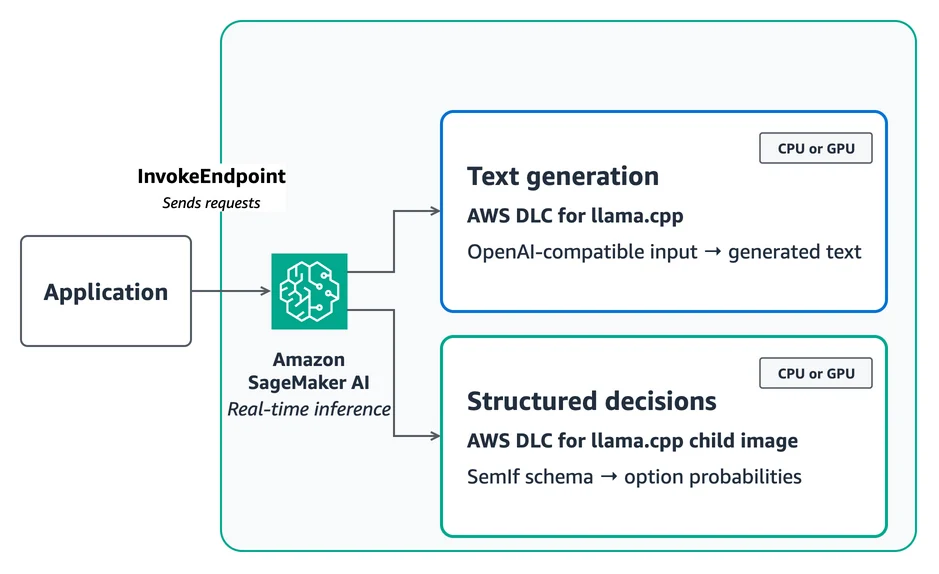
Users can leverage the AWS DLC for llama.cpp to serve OpenAI-compatible chat completions through SageMaker AI InvokeEndpoint. Alternatively, the runtime can be extended with SemIf, formerly known as OpenJev, which returns probabilities over declared options without decoding an answer token.
For the standard path, models are packaged as model.tar.gz and stored in Amazon Simple Storage Service (Amazon S3), referencing the published DLC image directly. The container locates the first .gguf file under /opt/ml/model, maps POST requests to llama-server, and passes environment variables to llama.cpp arguments.
Because the llama-server HTTP API does not expose final-position logits and state operations required by SemIf, the structured-decision path utilizes AWS CodeBuild to construct a child image stored in Amazon Elastic Container Registry (Amazon ECR). This child image preserves the DLC's compiled CPU or CUDA libraries while replacing the default server adapter.
Request Schemas and Use Cases
The AWS DLC for llama.cpp accepts standard OpenAI Chat Completions schemas, allowing developers to send a messages array with role and content along with generation controls like max_tokens and stream. The response returns an OpenAI-compatible choices array where generated text is read from choices[0].message.content.
Conversely, SemIf utilizes a constrained decision schema consisting of a caller-defined ID, unstructured state, a question, and an ordered list of allowed options. The response returns option IDs, probabilities, and raw option logits alongside prompt, timing, and pinned model metadata.
This architecture is ideal when applications define choices at request time and require models to interpret unstructured contexts, such as routing cases to queues, extracting single values from known sets, assigning incident priorities, or checking policy outcomes.
Performance Benchmarks and Infrastructure Trade-Offs
To quantify operational trade-offs, benchmarks were conducted using 231 public JevBench tasks sent serially to CPU and GPU endpoints. The GPU endpoint demonstrated significantly faster performance, exhibiting speeds 4.9 times faster at p50 and 32.2 times faster at p95 compared to the CPU configuration.
When configuring endpoint infrastructure, developers can use CPU instances for background, offline, or low-throughput workloads that tolerate seconds of response time. GPU instances are recommended for interactive decisions, long prompts, or workloads requiring strict tail-latency targets.
Sources
- AWS Machine Learning BlogDeploy decision models with llama.cpp on Amazon SageMaker AI
Continue chronologically

Related entity coverage
Related stories
Stop Guessing Auto Scaling Targets for TTS on Amazon SageMaker AI
Learn how to derive precise auto scaling targets for text-to-speech models on Amazon SageMaker AI using live endpoint measurements instead of guesswork.
Amazon SageMaker AI Releases 13 Inference Capabilities in 2026
Amazon SageMaker AI has expanded its infrastructure offerings with 13 new launches, focusing on managed endpoints and HyperPod inference efficiency.
Developers Access SageMaker Studio Through New AWS Experience
New Amazon SageMaker AI customers can now access a fully configured environment in just a few steps using social sign-in options and free tier credits.
Build Real-Time Voice Apps with vLLM-Omni on SageMaker AI
Learn how to deploy a text-to-speech model using the AWS vLLM-Omni Deep Learning Container on Amazon SageMaker AI for real-time voice apps.