Microsoft Overhauls Windows Search with Speed Focus
Microsoft is addressing long-standing frustrations with Windows 11 Search through a significant redesign now in testing. The update promises faster performance, modernized interfaces, and new task-oriented capabilities.
 Radwan AbdulhadiEditor and technology writer
Microsoft begins Windows Search overhaul
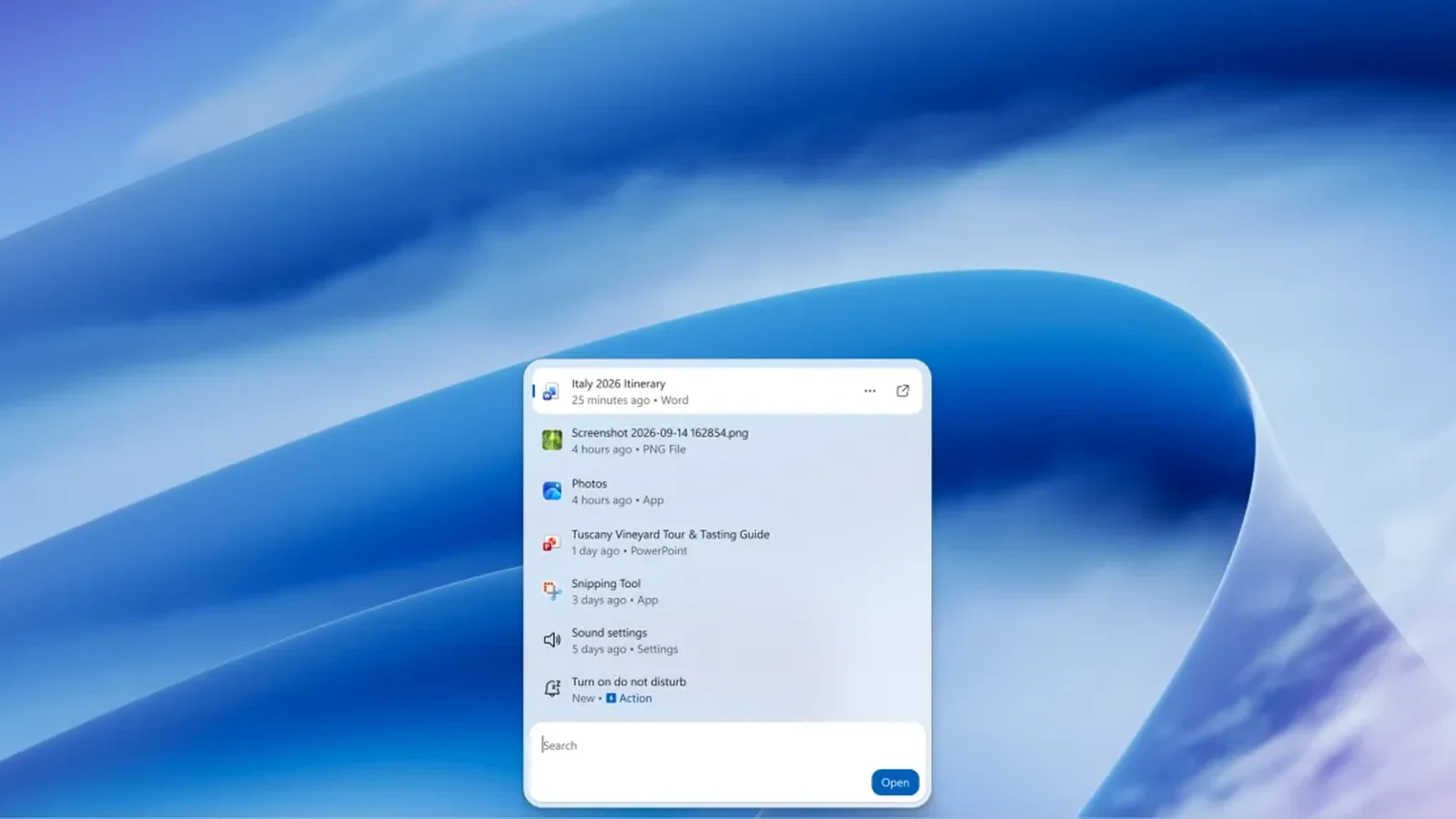
Microsoft has announced a significant overhaul of Windows Search, an initiative designed to resolve long-standing usability issues within Windows 11. The company acknowledges that Windows Search has been one of the most frustrating parts of the operating system for many users. To address this, Microsoft is rolling out a new redesigned version that is currently in testing. According to the report, this new experience is much faster, more capable, and a lot more modern than the previous iteration. This update represents a targeted effort to modernize a core component of the user interface. Further details on the changes are available in the full report from The Verge.
Performance and memory usage improvements
Anshul Rawat, corporate vice president of the Windows product team at Microsoft, highlighted the performance priorities behind the redesign. He stated that this new Windows Search experience is built for speed and is built on WinUI 3. Rawat noted that this change is part of a broader investment in modernizing core Windows experiences. Microsoft reports that early testing of the new search has shown substantial improvements in performance and memory usage. This suggests that the company is not adding extra bloat to Windows to improve search functionality. The official explanation for these technical decisions can be found in the Windows Insider blog post.
Visual redesign and inline results
The user interface has received a substantial visual upgrade alongside the backend performance work. Microsoft has implemented speedy animations and introduced a large preview pane to enhance the reading experience. In previous iterations, searching for information such as the height of an actor would take a few seconds to figure out and display a miniature Bing result. The new Windows Search surfaces the result inline, much like the modern search interfaces seen in iOS and Android. These inline results also extend to previews of PowerPoint presentations, photos, and other files, allowing users to view content directly within the search window.
Backend understanding and intent matching
While the visual changes are prominent, Microsoft is also improving the fundamental mechanics of how the search engine operates. Rawat explained that the company is improving how Windows Search understands what users are looking for. Specific improvements include better matching for typos and synonyms, which should reduce friction when users cannot recall exact terms. This backend work complements the visual redesign by ensuring that relevant results appear quickly and accurately. The goal is to make the search experience feel more natural and responsive to user input.
Search as a launcher for system actions
The most significant functional change is the ability to use Windows Search like a launcher that takes actions for tasks. Users can now use the search bar to toggle system settings such as Bluetooth or dark mode on and off. Additional capabilities include asking search to minimize windows or open apps side-by-side. If users have Phone Link set up, these actions extend to their connected phone. For example, typing a request to send a text message will send the message from the phone. This transforms the search bar from a passive lookup tool into an active command center for daily workflows.
Availability and future plans
Microsoft is testing this new Windows Search interface with its Windows Insiders right now. This testing phase should mean the feature appears in Windows 11 in the coming months. Looking to next year, work is already underway to bring the new Windows Search experience to the Start menu. The system is designed to adapt naturally to different taskbar positions and Windows configurations. Microsoft's stated goal is to make Windows Search more capable, with more natural ways to express what users need. The company aims to provide richer information in context and more ways to get things done directly from search. Readers interested in ongoing Microsoft coverage can subscribe to the Notepad newsletter.
Sources
- The VergeMicrosoft’s new Windows Search is exactly what Windows 11 needs
Continue chronologically


Related entity coverage
Related stories
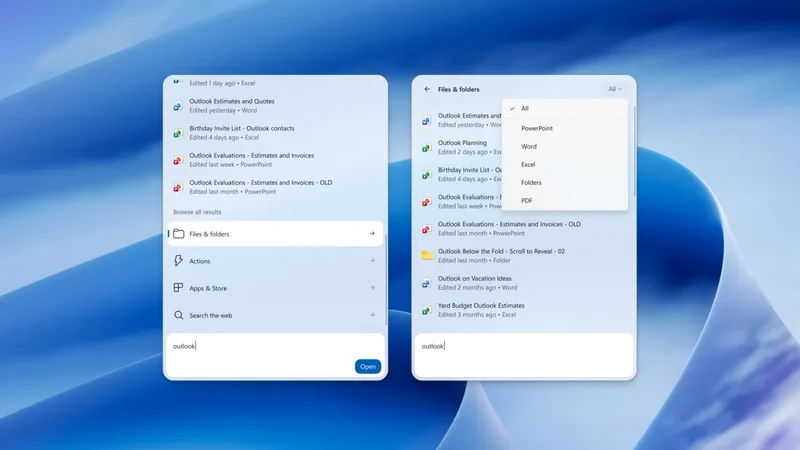
Windows 11 Tests New Shortcuts and Search Features
Microsoft is testing new Windows 11 Insider builds featuring Xbox gaming mode shortcuts, comprehensive search filters, and phone controls.
Windows 11 Marks Five Years Since Official Release
Microsoft's operating system marks its fifth anniversary since release, reflecting on early hardware controversies, AI pushes, and recent updates.
Microsoft: October Updates Did Not Fix Windows VPN Issues
Microsoft admits it mistakenly flagged an Always On VPN bug as fixed in October 2026 Windows updates, with a proper resolution planned for later.

Microsoft Fixes September VPN Update Issues
Microsoft has resolved a known issue that caused Always On VPN connection failures following the deployment of September 2026 Windows 11 security updates.