Windows 11 Tests New Shortcuts and Search Features
The latest software updates for Microsoft's operating system bring deeper quick settings integration to Xbox mode alongside a heavily revamped search experience.
 Radwan AbdulhadiEditor and technology writer
Introduction to the Latest Insider Updates
Microsoft has released new software updates for its operating system that introduce a variety of adjustments, focusing heavily on user convenience and interface efficiency. According to details shared through a <a href="https://blogs.windows.com/windows-insider/2026/10/30/announcing-new-builds-for-30-october-2026/">search improvements</a> publication on the official Windows blog, the latest updates target both entertainment workflows and everyday system tasks. Beta Build 26220.9836 and Experimental Build 26340.9843 are now available to users enrolled in the <a href="https://learn.microsoft.com/en-us/windows-insider/release-notes/experimental/preview-build-26340-9843">Windows 11 Insider build</a> program.
These preview releases are designed to test experimental functions before they roll out to the general public. As reported by <a href="https://www.theverge.com/tech/1024058/windows-11-search-improvements-xbox-quick-settings">The Verge</a>, the upgrades specifically target how users interact with gaming features and system search tools, streamlining navigation across multiple device configurations.
Xbox Gaming Mode Quick Settings Integration
One of the standout additions in the latest preview packages is the integration of quick settings directly within Xbox mode. Historically, users playing games or navigating through the dedicated gaming interface had to minimize or exit their current environment to modify fundamental hardware parameters.
The newly introduced Xbox shortcuts change this behavior by allowing players to control essential hardware aspects directly from the overlay. Users can now manage Bluetooth connectivity, wireless local area network settings, and power configurations without ever having to exit gaming mode. This improvement reduces interruptions during gameplay sessions and keeps the user focused on the primary application.
Revamped Search Features and Filters
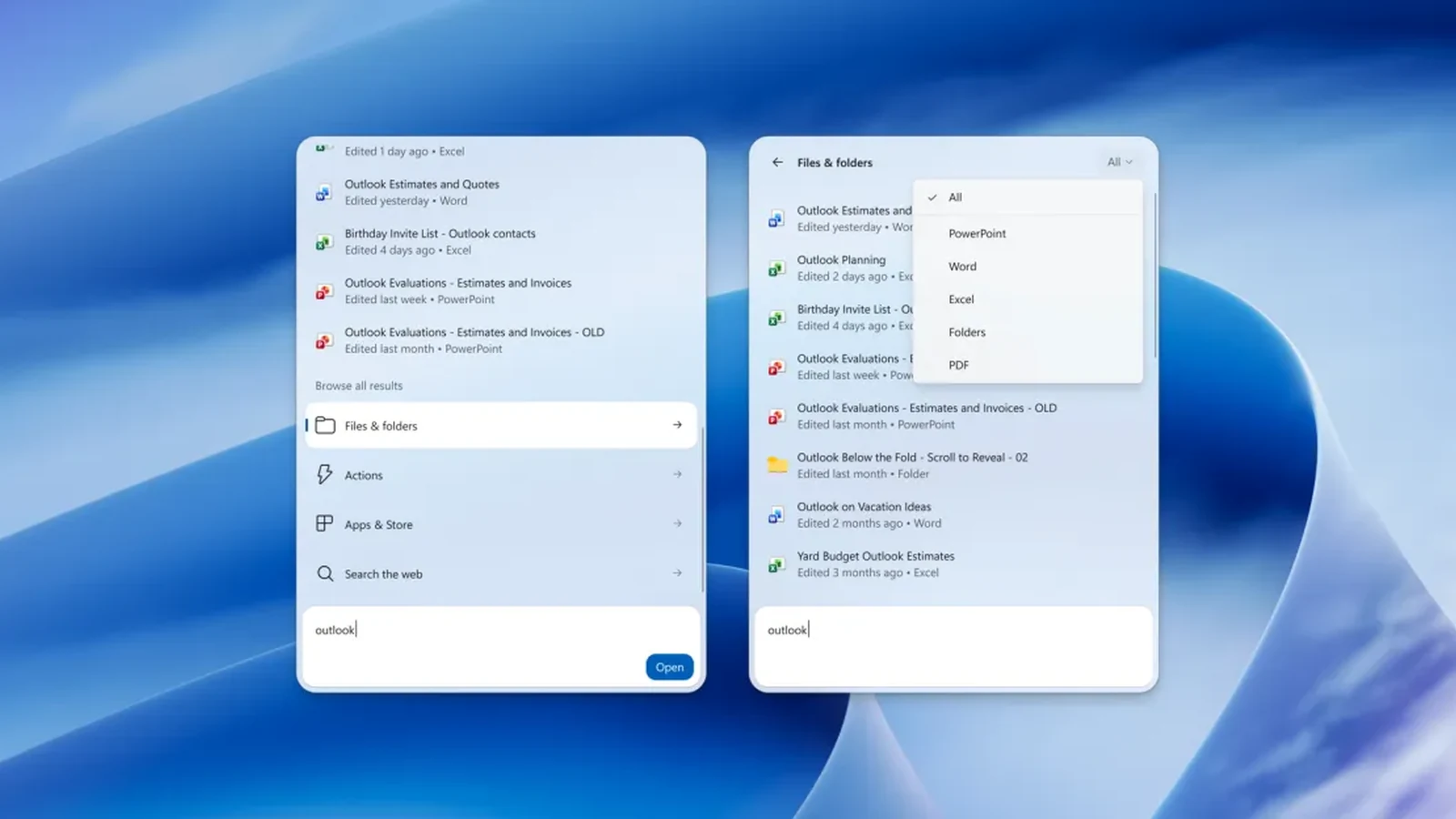
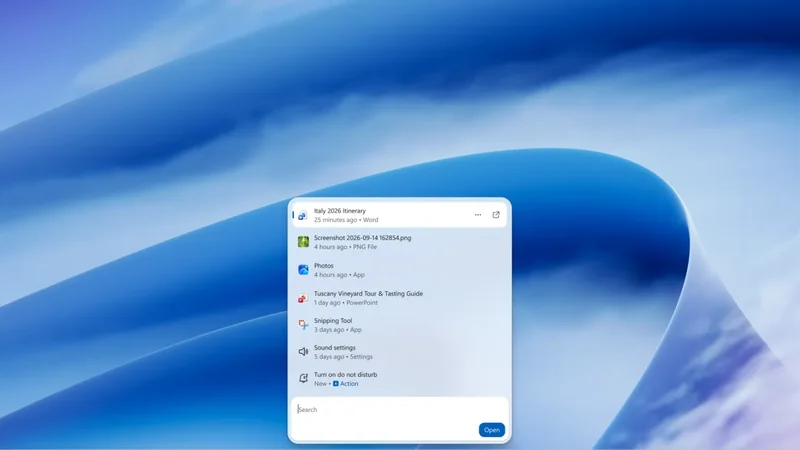
Alongside the gaming enhancements, the operating system's search mechanism has undergone a comprehensive overhaul. The updated interface allows users to narrow down their queries using distinct filters, separating results into categories such as specific files, system actions, and web results.
Furthermore, the search utility now presents much deeper metadata for individual files. When searching for documents or media, the tool can display specific details such as the author of the file and the exact timestamp of when it was last modified. Additionally, the search box can dynamically pull in real-time information cards, including current weather forecasts and stock price charts, making the utility far more versatile for day-to-day productivity.
Direct System and Connected Phone Actions
Beyond traditional file retrieval and web queries, the search box has been upgraded to execute direct system commands and phone interactions. Users can type specific commands into the search bar to modify hardware states, such as adjusting the screen brightness or altering the master system volume.
The functionality extends to connected mobile devices as well. Users can initiate phone-related operations directly through the desktop search interface, including the ability to place phone calls. This integration bridges the gap between mobile hardware and the desktop environment, centralizing control into a single entry point.
Training Search Results with Feedback Controls
To ensure long-term accuracy and relevance, Microsoft has incorporated a feedback mechanism directly into the search flyout. Users can now evaluate individual search suggestions or results by interacting with inline thumbs-up or thumbs-down icons.
By clicking these evaluation icons, users help train the search algorithm over time, allowing the system to adapt to individual preferences and organizational habits. This crowdsourced feedback loop is intended to refine suggestion quality across different usage scenarios.
Availability and Access for Testers
The new features are not yet part of the stable retail branch of the operating system. They are presently restricted to users who participate in testing cycles through the preview channels. Developers and enthusiasts who wish to review the complete list of adjustments can consult Microsoft's official documentation and release notes.
As testing progresses in the beta and experimental channels, user feedback will dictate whether these specific shortcuts and search enhancements eventually transition into public release builds for all Windows 11 users.
Sources
- The VergeWindows 11 tries new shortcuts for Xbox gaming mode and search
Continue chronologically

Related entity coverage
Related stories
How to Set Up and Use Xbox Mode on Your Windows 11 PC
Learn how to activate and navigate Xbox mode on Windows 11 to create a controller-friendly, gaming-focused interface for your PC library.
Microsoft Overhauls Windows Search with Speed Focus
Microsoft overhauls Windows Search for Windows 11 with a focus on speed and capability, including launcher actions and improved preview panes.
Windows 11 right-click menu and Cloud Rebuild preview update
Microsoft rolls out a Windows 11 preview update featuring right-click menu customization and Cloud Rebuild, alongside declining PC revenue.

Microsoft Updates Windows 11 with Memory and Performance Boosts
Microsoft has rolled out Windows 11 updates designed to improve responsiveness and memory efficiency, especially benefiting PCs with lower RAM.