Exploring Android's Built-In Screen Time Tool
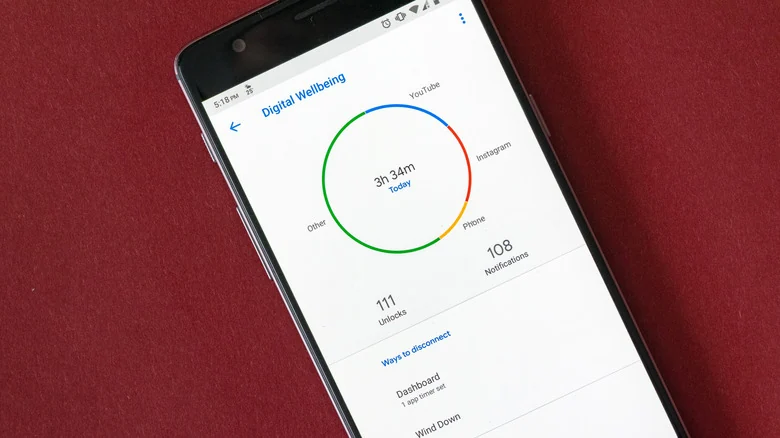
Most Android users overlook the built-in Digital Wellbeing application, a powerful usage-tracking tool designed to help curb excessive screen time.
 Radwan AbdulhadiEditor and technology writer
The Hidden Utility on Android Devices
Many smartphone users waste significant portions of their days scrolling through social media platforms and mobile games without realizing it. According to an <a href="https://www.engadget.com/2294291/built-in-android-phone-app-most-users-never-use/">Engadget</a> report, Android devices feature a built-in utility designed specifically to break these scrolling habits, though it often remains untouched in the device settings from the day of purchase. Further details are available from Engadget in the original source material.
The usage-tracking tool, known as Digital Wellbeing, has recorded over 10 billion installations across the Android ecosystem. Despite this massive reach, most individuals rarely open it intentionally. Because the application typically appears without an icon on the home screen, users must navigate deep into the Settings menu to locate it.
Core Functionality and Behavioral Tracking
Digital Wellbeing offers a comprehensive behavioral snapshot by monitoring app usage patterns and incoming notification volumes. With roughly 1.49 million user reviews and a solid 4.1-star rating on the Google Play Store, the tool provides reliable tracking capabilities for anyone wanting to monitor their mobile habits.
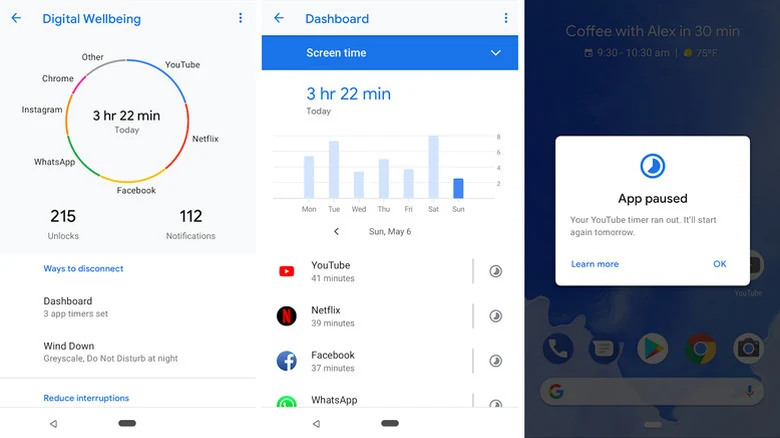
Once opened through the device settings, the free Google-developed tool delivers a daily chart covering overall screen time, device unlock frequency, notification counts, and the most frequently launched applications. Users can tap on individual apps within the interface to inspect the exact duration spent using them on any given day.
Manufacturer Alternatives and Ecosystem Variations
While Google's application comes pre-installed on many Android devices, not every manufacturer utilizes the exact same software. Google requires Android device makers to include screen-time and parental-control tools prominently within the top level of the Settings menu, but gives them the freedom to use either Google's version or a proprietary alternative.
For example, Samsung Galaxy smartphones ship with a custom screen-time management system instead of Google's default application. Huawei has similarly chosen to equip its devices with its own equivalent software. While these brand-specific alternatives generally offer core tracking features similar to Google's app, manufacturers frequently introduce unique additions and extra operational modes.
Timers, Restrictions, and Specialized Modes
Beyond passive tracking, the built-in toolset extends to active usage limitation features such as app timers. Users can configure daily caps for specific applications or entire categories, such as social media platforms. When a timer expires, the app icon dims and the software closes for the remainder of the day, resetting automatically at midnight.
The platform also includes targeted environments designed to minimize distractions before sleep. Bedtime mode allows users to fade their displays to grayscale while scheduling Do Not Disturb, encouraging them to put down their phones at night. Additionally, Focus mode pauses distracting applications and mutes their notifications with a single tap.
Advanced Manufacturer Features
Samsung's version of Digital Wellbeing expands monitoring further by categorizing time spent across different software types, such as gaming versus social media, productivity, and finance. Samsung devices can also log whether a user handles their smartphone while driving or walking.
Furthermore, Samsung introduces advanced operational routines that adapt the phone's behavior to specific real-world contexts. When a customized Work mode is activated through Modes and Routines, the smartphone can automatically restrict notifications to vibration-only and engage power saving. These routines can trigger based on specific time intervals, weekdays, geographic locations via GPS, or the launch of workplace communication applications.
Additional routines can be tailored for activities like exercising, relaxing, theater attendance, or gaming. Whether utilizing Google's default application or an alternative manufacturer version, exploring these built-in system tools offers an effective way to evaluate mobile phone habits and manage daily screen time.
Sources
- EngadgetThe built-in Android phone app most users never bother to use (but should)
Continue chronologically
Related entity coverage
Related stories
What to Look For When Buying a Cheap Android Phone
Discover the essential non-negotiable features you need to look for when shopping for a budget Android phone priced at $300 or less.
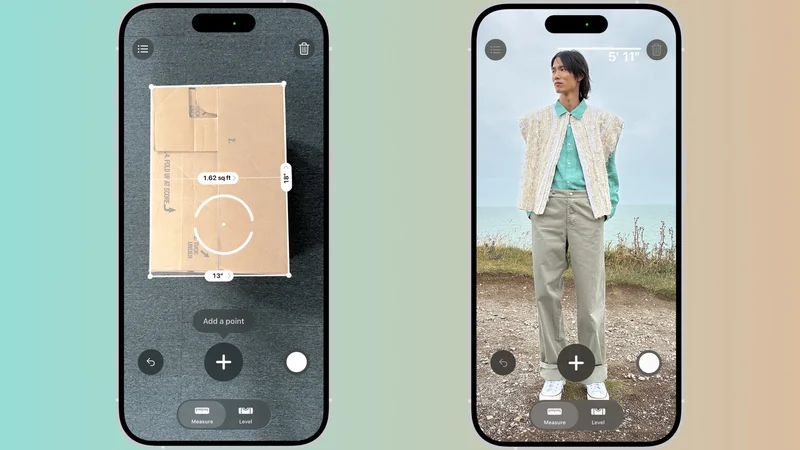
Apple's Hidden iPhone Measure Tool: How It Works
Discover Apple's built-in iPhone Measure app, using cameras and LiDAR to size up everyday objects when a physical tape measure is out of reach.
Samsung One UI 9 Update Brings New Features to Galaxy
Samsung Galaxy devices are receiving the One UI 9 update based on Android 17, introducing My FanCam, updated Quick Panel tools, and scanning upgrades.
Google Updates Android Distribution Numbers for 17 and 16
Google has refreshed its Android distribution numbers, showing that Android 17 sits at 1% adoption while Android 16 claims over 25%.