Arctic Fox Technologies Announces The Super Mouse
Arctic Fox Technologies introduces the Super Mouse, a wired multifunction peripheral featuring a 3.1-inch central touchscreen designed to replace several desk accessories.
 Radwan AbdulhadiEditor and technology writer
Introduction to the Super Mouse
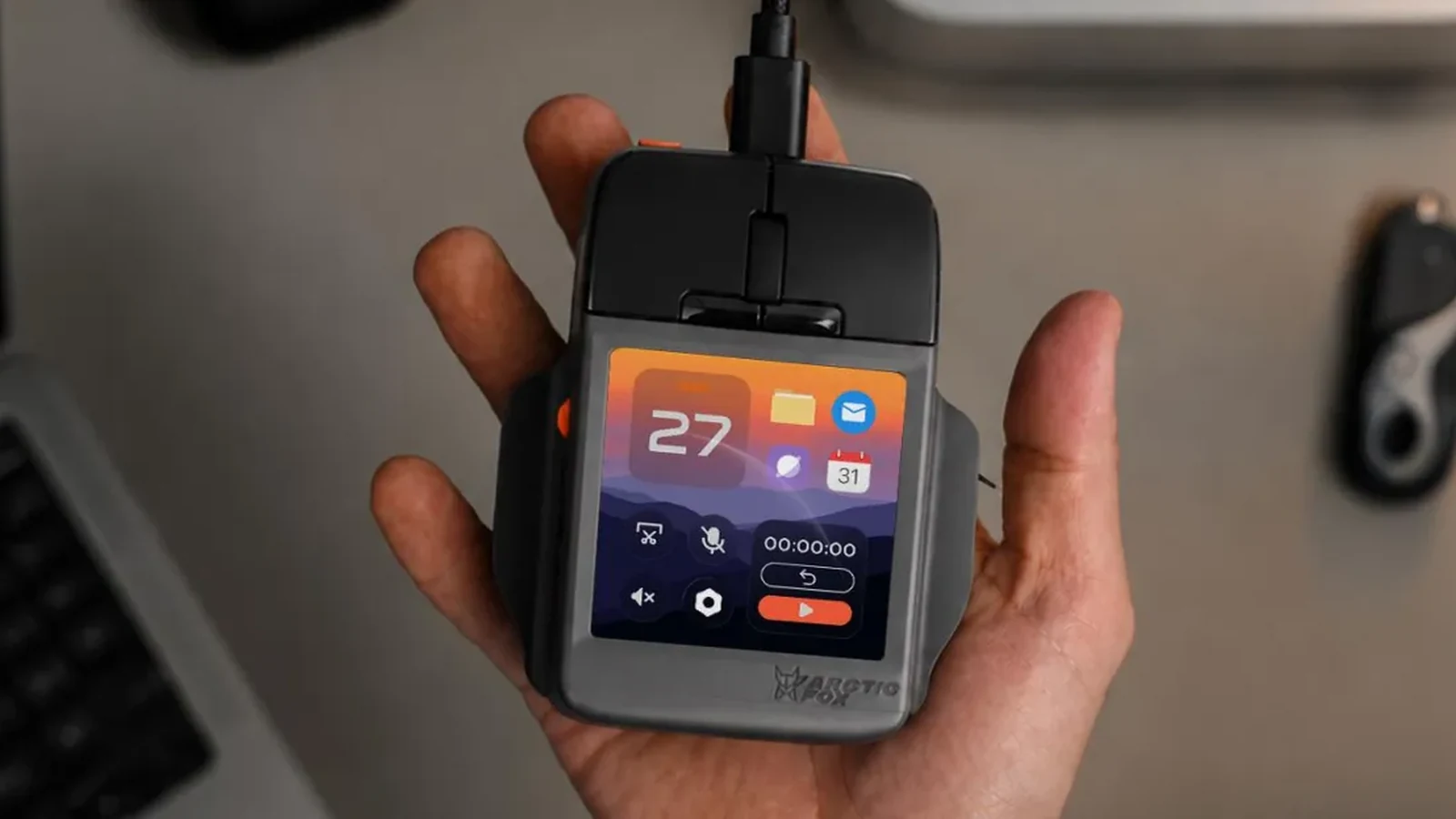
A company called Arctic Fox Technologies has announced a new multifunction mouse that forgoes a myriad of customizable shortcut buttons peppered across its surface for a compact touchscreen sitting beneath your hand. The Super Mouse may not prioritize ergonomics with its boxy design, but it can replace other peripherals on your desk, like a trackpad, macro pad, or streaming controller. If you are faster at typing on your phone, the Super Mouse could potentially even replace a full-size keyboard with a smartphone-sized alternative that even includes swipe typing.
The peripheral is currently available for preorder through a Kickstarter crowdfunding campaign where backers can secure it at a discounted price of $199. Full retail pricing is planned to be $249 once the product hits the general market. Delivery for backers is expected to start in February 2027, though consumers are advised to take that estimate with caution due to the potential for unforeseen delays common in crowdfunding campaigns.
Hardware Design and Display Specifications
The pricing of the Super Mouse places it above other historical attempts by various manufacturers to merge standard computer mice with integrated touchscreens. For instance, alternatives like Turtle Beach’s Command Series MC7 incorporate just a 2.25-inch narrow display situated along the side of the device. In contrast, the Super Mouse features a much larger 3.1-inch, 720 x 720 resolution touchscreen positioned directly front and center.
Positioned above and around the generous touchscreen are a pair of standard mouse buttons, a functional scroll wheel, and two customizable “hyper keys.” Despite housing a full color display under the palm of the user's hand, the device maintains traditional input layouts alongside its advanced visual interface capabilities.
Control Panel and Contextual Workflow Shortcuts
The primary utility of the built-in touchscreen is to provide quick application launching through what its creators refer to as a “Control Panel.” This panel can accommodate up to 16 distinct shortcuts, macros, or application launchers directly beneath the user's hand. Furthermore, the display features contextual functionality that adapts and presents relevant shortcuts based on the active application.
When working with complex video editing software such as Adobe Premiere, the touchscreen dynamically displays timeline editing and playback shortcuts. Users who maintain specific workflow requirements or utilize applications not automatically recognized by the system can manually configure and tailor the Super Mouse functionality by utilizing the company's dedicated Flow desktop application.
Productivity Features and Local Processing
Beyond launching applications and handling custom macros, the touchscreen supports various productivity enhancements. When synced with Google Calendar, the display can deliver event and meeting reminders directly to the user's hand. Additional software functions include local voice-to-text processing performed entirely on the mouse itself, multiple user profile management, integrated focus timers, and productivity tracking metrics.
The hardware architecture also integrates an onboard gyroscope. This sensor enables users to control presentation slideshows or scrub through video playback files simply by moving the physical mouse body across the desk surface.
Power Delivery and Hardware Limitations
One notable design choice regarding the Super Mouse is the complete absence of wireless connectivity options. Rather than incorporating an internal rechargeable battery pack, the device draws all necessary operating power directly from a wired USB-C port connection. As a result, users must keep the peripheral continuously tethered to their personal computer during operation.
The reliance on a wired connection ensures continuous power delivery to the high-resolution display and internal processing components without the weight or discharge concerns associated with powering a full-color touchscreen via battery power alone.
Sources
- The VergeThe Super Mouse puts a touchscreen macro pad under your hand
Continue chronologically

Related stories
HyperX Cloud Alpha Air Open-Back Gaming Headset Released
HyperX launches the Cloud Alpha Air, its first open-back wired gaming headset featuring 40mm dynamic drivers, lightweight design, and a $149.99 price tag.
Why a Second Monitor is a Major Workflow Upgrade
Discover the productivity benefits of adding a second monitor to your setup, from seamless multitasking to better organization and reduced window switching.
Google Japan Reveals Conveyor-Belt Gboard Keyboard
Google Japan has unveiled its latest quirky keyboard creation: a 3D-printable Gboard featuring moving conveyor belts designed for easier one-handed typing.
Why microSD Express cards matter for the Nintendo Switch 2
Discover why the Nintendo Switch 2 requires a microSD Express card for expandable storage and how to choose the right capacity for your game library.