Cloudflare Launches Traces in Open Beta for End-to-End Request Visibility
The new open beta release brings deep, end-to-end platform observability to developers, allowing teams to track requests across security settings, caching layers, and custom code.
 Radwan AbdulhadiEditor and technology writer
Expanding Platform Observability
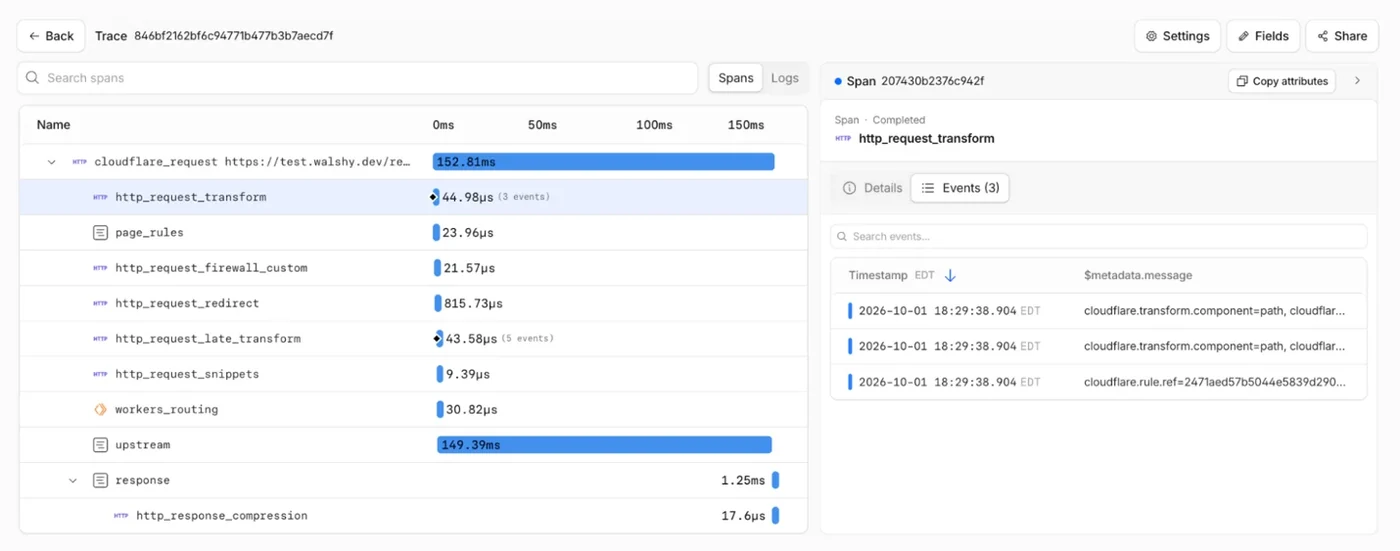
Cloudflare has introduced [Cloudflare Traces](https://developers.cloudflare.com/observability/traces/) in open beta, extending automatic tracing capabilities beyond Workers to the rest of the request path. According to the Cloudflare Blog, users can now view supported security rules, transformations, cache decisions, routing, Worker execution, and origin handling within a single timeline. This feature represents a long-term investment in [OpenTelemetry](https://opentelemetry.io/) and aims to provide deeper visibility into request behavior across the entire stack.
The platform previously launched automatic instrumentation for Worker invocations last year, showing work performed inside the runtime. The launch of [automatic tracing beyond Workers](https://blog.cloudflare.com/workers-tracing-now-in-open-beta/) brings that same level of platform-wide visibility to everyone using Cloudflare, whether they are building directly on the platform or placing Cloudflare in front of an origin server.
Capturing Request Timelines and Spans
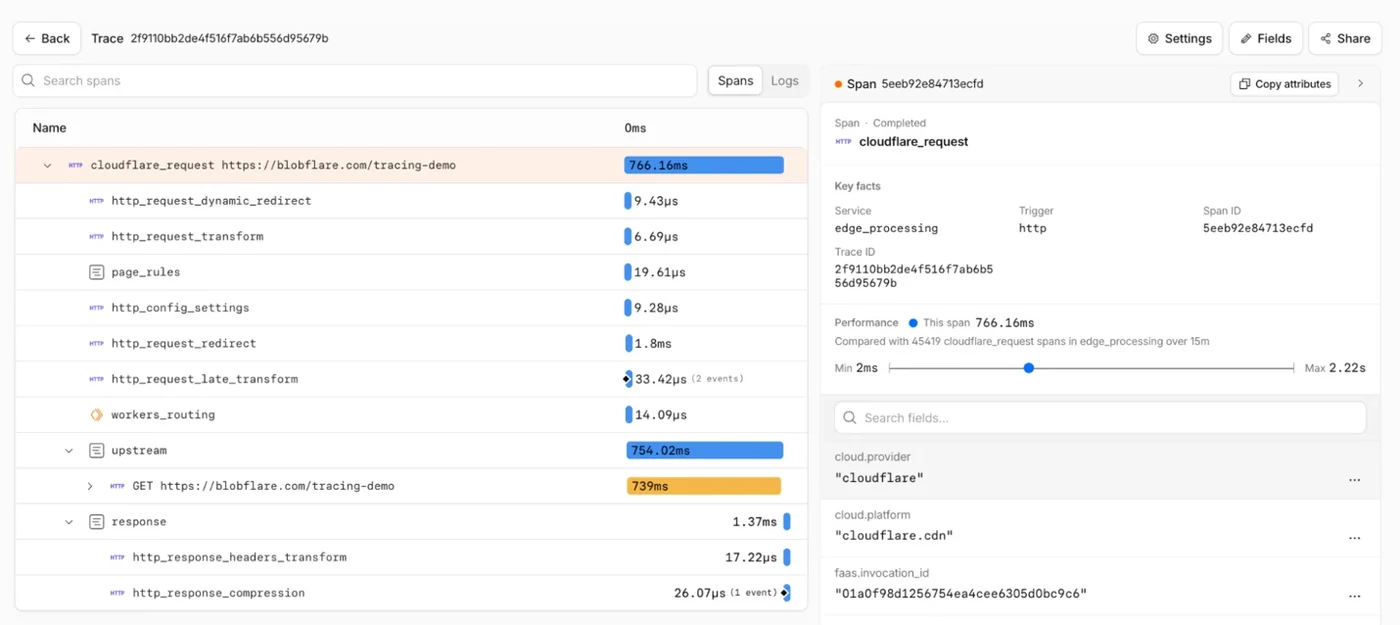
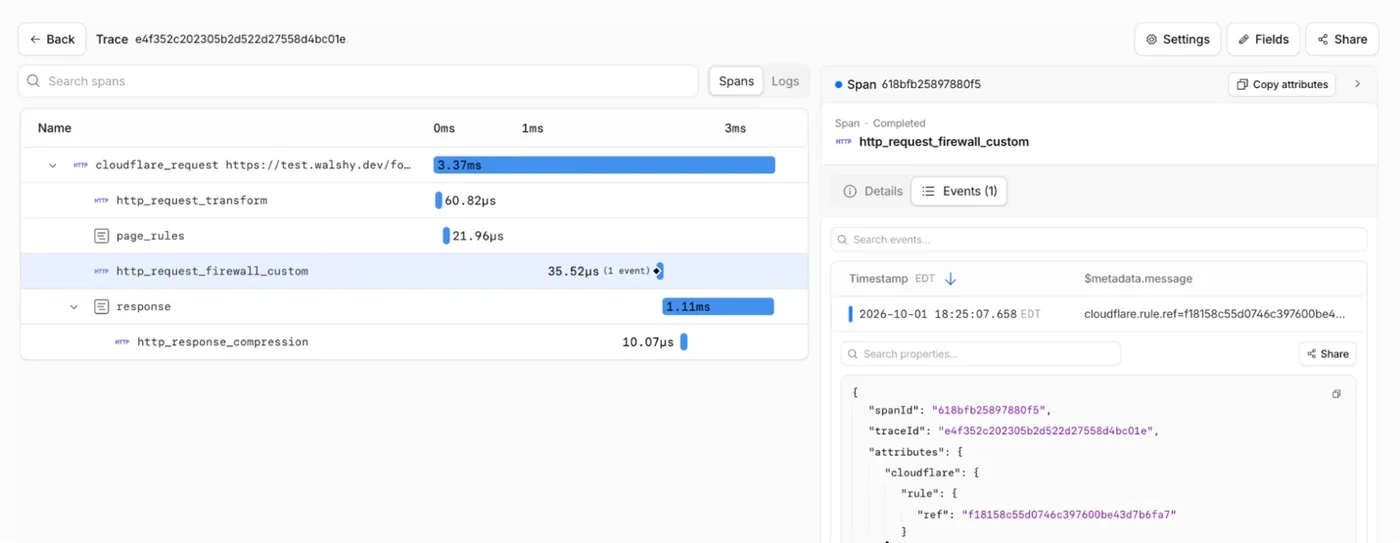
A request path through modern web infrastructure can be complicated, passing through security rules, transformations, routing, and caching. [Automatically trace requests across Cloudflare](https://developers.cloudflare.com/observability/traces/spans/) records each supported step as a span, including timing, outcomes, and relevant attributes. Instead of manually reconstructing requests from separate logs and configurations, engineers can inspect the entire path in one unified place.
Engineers can investigate specific issues such as why a request was blocked or challenged by security settings. Spans show when custom or managed rules evaluated a request, how long the evaluation took, and which rule was responsible. Similarly, developers can check Transform Rules to see URL rewrites, or inspect routing spans to verify which Page Rules, Snippets, or Workers handled the incoming traffic.
Sampling Control and Trace Rules
To balance visibility, data volume, and operational costs, users can [enable tracing in the Cloudflare dashboard](https://developers.cloudflare.com/observability/traces/#enable-tracing) and configure a baseline sampling rate. For example, a team might choose to trace 1 percent of traffic during normal operations to maintain a continuous view of request behavior without generating excessive telemetry data.
When a deeper investigation is necessary, [Trace Rules](https://developers.cloudflare.com/observability/traces/configuration/#trace-rules) allow teams to override the baseline sampling rate for matching traffic. Administrators can capture 100 percent of requests for a specific hostname, source IP, or debugging header without increasing tracing volume across the rest of the domain.
Distributed Tracing and Standards Integration
Cloudflare Traces supports true distributed tracing by accepting [W3C traceparent headers](https://www.w3.org/TR/trace-context-1/#traceparent-header) from incoming requests. This allows Cloudflare spans to seamlessly join an existing trace that began before the request reached the platform. Cloudflare can also forward a new traceparent header to the origin server.
Teams can [Investigate traces in Cloudflare](https://developers.cloudflare.com/observability/traces/#inspect-a-trace) directly through the dashboard or [Export traces with OpenTelemetry](https://developers.cloudflare.com/observability/export/opentelemetry/#enable-export-for-cloudflare-traces) to any destination supporting an Open Telemetry Protocol [endpoint](https://opentelemetry.io/docs/specs/otlp/). This design ensures that platform telemetry remains portable and integrates smoothly with existing enterprise observability tooling.
Sources
- Cloudflare BlogIntroducing Cloudflare Traces: follow requests through our entire platform
Continue chronologically

Related entity coverage
Related stories
Cloudflare Launches Eight Major Observability Updates
Cloudflare has introduced eight major updates combining logs, traces, analytics, alerts, dashboards, querying, and telemetry export into one platform.
Cloudflare Expands Access to Enterprise Features for All
Cloudflare provides an update on its pledge to eliminate product access tiers, expanding Logpush, RBAC, and multi-account features to all plans.
Cloudflare Rebuilds Containers to Scale Agent Sandboxes
Cloudflare has rearchitected its Containers platform with 6x faster startup times, runtime image selection, and filesystem snapshots in public beta.
Cloudflare Launches Turnstile Spin for AI Agents
Cloudflare introduces Turnstile Spin to help AI coding agents securely wire up website bot protection and server-side verification effortlessly.