Apple Details iOS 27 Parental Controls and Screen Time Overhaul
Apple has introduced a major overhaul to parental controls and Screen Time features alongside its iOS 27 update, incorporating safety tools developed with the American Academy of Pediatrics.
 Radwan AbdulhadiEditor and technology writer

Overview of iOS 27 Parental Control Updates
The September release of iOS 27 brought significant software enhancements, including an extensive overhaul of parental controls and Screen Time tools. For these updates, Apple worked alongside the American Academy of Pediatrics to build safety features and released a Building Healthy Digital Habits companion guide to help parents balance digital device usage with essentials like sleep, schoolwork, exercise, and family time.
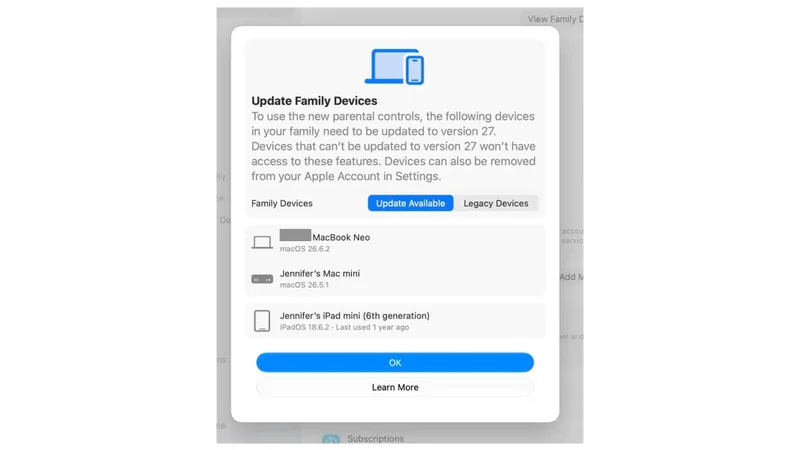
To utilize the new Screen Time capabilities, every device within a Family Sharing group—whether it is an iPhone, iPad, Mac, Apple Watch, or Apple TV—must be updated to run iOS 27, iPadOS 27, macOS 27, watchOS 27, or tvOS 27. Hardware that cannot support the latest software will continue relying on the older iOS 26 controls, creating a potential gap for households using mixed hardware generations.

New Screen Time and Safety Features
Among the primary additions is the replacement of traditional App Limits with Time Allowances, offering a more granular approach to device management. Parents can establish an overall daily limit—such as three hours—and decide how that time is distributed among categories like social media, gaming, and entertainment. Parents can also set up custom categories to manage groups of apps rather than configuring dozens of individual limits.
Safari activity management sees updates through the new Ask to Browse feature, which requires parental approval before a child can visit unapproved websites. These requests arrive directly in Messages. Additionally, Ask to Add Contacts ensures children must request permission before calling or texting an unfamiliar phone number. Communication Safety, which previously flagged nudity in Messages, AirDrop, and FaceTime, now also detects and blurs graphic violence and gore.
Another addition is the Pause Device feature, which allows parents to instantly lock a child's device with a single tap during activities like dinner or homework time. The overall setup process has also been simplified, providing age-appropriate app recommendations for new child accounts rather than placing every default application onto the home screen.

Getting Started With Child Accounts
Configuring the updated system begins by making sure you have a Family Sharing group set up on your ecosystem. Users can navigate to Settings > Family on an iPhone to review device versions and manage accounts. If any connected hardware is missing the latest software, the settings menu will display information outlining what needs to be updated.
When adding a new child account, the streamlined setup process applies default restrictions varying by age. For instance, Ask to Browse, Limit Adult Websites, and contact management tools are enabled automatically for children under 13. Communication Safety is enabled for all users under 18. Once a child turns 13, many restrictions transition to parental discretion, meaning settings like Ask to Browse no longer activate by default.

Managing Schedules and Usage Dashboards
Parents can establish separate schedules for weekdays and weekends, apply category-specific caps within daily allowances, and enable Ask to Buy for application purchases. The redesigned Screen Time dashboard provides a quick overview of daily metrics, helping parents review device habits without navigating through complicated menus. Apple recommends revisiting these configurations periodically alongside the American Academy of Pediatrics guidance as children grow older.
Sources
- EngadgetHow to use the parental controls on iOS 27
Continue chronologically


Related entity coverage
Related stories
Apple Screen Time Update Sparks Family Sharing Frustration
Apple's revamped Screen Time rollout faces user frustration due to strict Family Sharing requirements that demand every household device run OS 27.
Apple and AAP Release New Guide for Healthy Digital Habits
Apple has partnered with the American Academy of Pediatrics to launch a new guide helping families establish healthy digital habits and screen time balance.

Apple Debuts the iPhone Duo: What to Know
Explore everything you need to know about the Apple iPhone Duo, Apple's first folding smartphone, including hardware, features, pricing, and trade-in deals.
Apple Announces iPhone Duo Foldable With A20 Pro and iOS 27
Apple unveils the foldable iPhone Duo featuring its largest iPhone display ever, A20 Pro performance, iOS 27, and Siri AI powered by Apple Intelligence.