Microsoft Shares Steps to Fix Broken Exchange Online EWS Apps
Microsoft has outlined methods for IT administrators to temporarily restore functionality to Exchange Web Services applications that stopped working following recent API changes in Exchange Online.
 Radwan AbdulhadiEditor and technology writer

Understanding the Exchange Web Services API Retirment
Microsoft has detailed how IT administrators can address broken applications following the initial phase of retiring the Exchange Web Services (EWS) API in Exchange Online. EWS serves as an interface for developing applications capable of accessing mailbox items like email messages, meetings, and contacts from both Exchange Online and on-premises servers. This API underpins a variety of software tools, including older desktop versions of Outlook for Windows, Outlook desktop add-ins, Apple Mail and Calendar on macOS, and several other third-party utilities. Further details are available from BleepingComputer in the original source material.
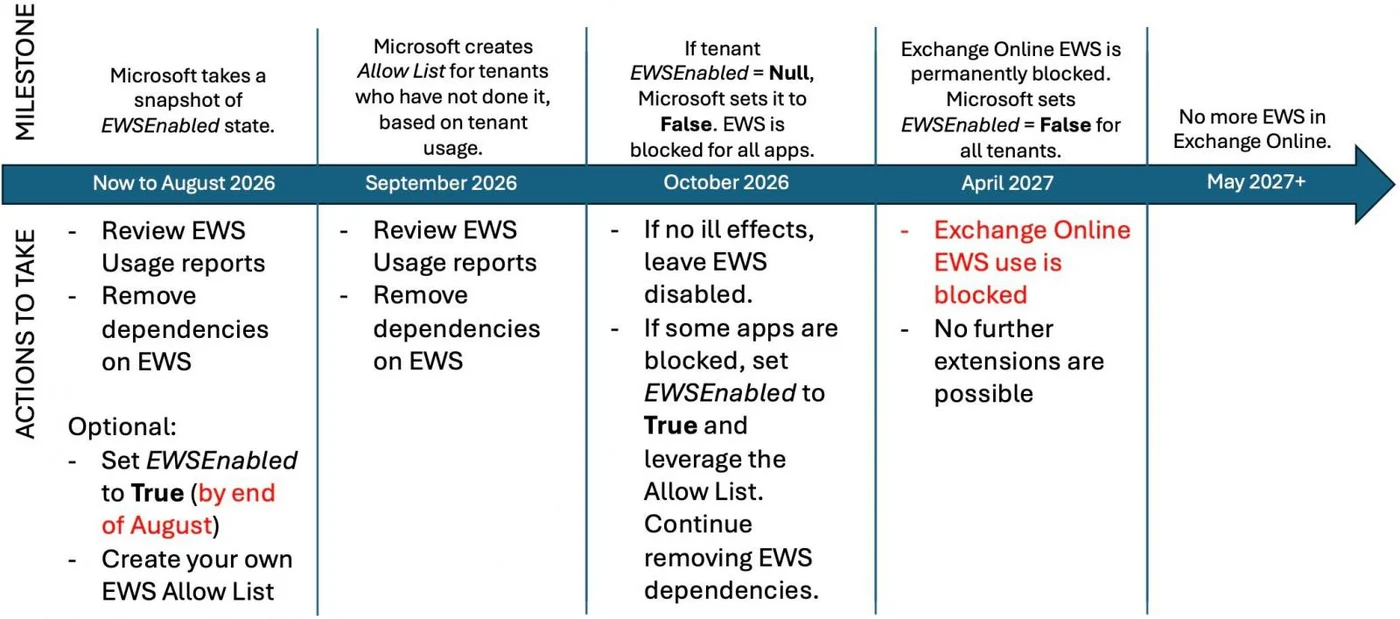
The software giant previously detailed its retirement timeline regarding these legacy capabilities, tracing back to earlier warnings issued years ago. Following a September 2023 announcement regarding the impending phase-out schedule, the company started blocking the EWS API by default in cloud environments. When this protocol is disabled, impacted applications typically display error messages indicating that the EWS protocol is unavailable, or they prompt users repeatedly for their usernames and passwords.
Methods to Temporarily Re-enable EWS in Exchange Online
To resolve disruptions caused by disabled EWS features, Microsoft explained that tenant administrators can restore access using administrative controls in the Microsoft 365 admin center. By navigating to the Baseline Security Mode page and unchecking the option to block the entire organization from using EWS, administrators can temporarily bring the blocked services back online.
Alternatively, IT professionals can utilize Exchange Online PowerShell to execute a specific command. Running the command 'Set-OrganizationConfig -EWSEnabled $true' will successfully re-enable the service within a window of four hours, helping restore normal operations for dependent tools across the organization.
Limitations and Long-Term Solutions for Developers
While administrators can currently restore functionality, the software maker emphasizes that this measure is strictly temporary. According to guidance shared by Microsoft, the ability to re-enable EWS will permanently cease to function in April 2027 when the final shutdown takes effect.
The long-term resolution requires organizations and developers to update their software configurations. System administrators must contact application vendors to secure updated software versions that avoid relying on EWS. For internally developed solutions, developers must rewrite application code to omit EWS calls entirely.
Transitioning to Microsoft Graph and Scope of Impact
Software developers currently utilizing the legacy EWS API are strongly advised by Microsoft to migrate their solutions to the Microsoft Graph API prior to the final retirement date. The Graph API offers near-complete feature parity with EWS across the vast majority of operational scenarios.
It is worth noting that the EWS retirement process exclusively targets Microsoft 365 and Exchange Online cloud deployments. The API will continue to operate normally within on-premises Exchange Server installations, allowing local environments to maintain their current setups without disruption.
Sources
- BleepingComputerMicrosoft shares how to fix broken Exchange Online EWS apps
Continue chronologically


Related entity coverage
Related stories
Microsoft Outlook to block MSIX attachments in November
Microsoft announces plans to block .msix and .msixbundle file attachments in Outlook Web and the new Outlook Windows client starting next month.

Microsoft 365 Family Plan Drops to Shared 2TB Storage
Microsoft changes its 365 Family plan storage model from 1TB per member to a shared 2TB space, while keeping the pricing at $13 a month.

Microsoft Patches Two Dozen RCE Flaws in Office Suite
Microsoft has rolled out security updates addressing over 30 vulnerabilities, featuring two dozen high-severity remote code execution bugs in Office.

Ryan Roslansky to Leave Microsoft and LinkedIn After 18 Years
Ryan Roslansky, Executive Vice President of LinkedIn and Microsoft 365, is stepping down after nearly 18 years with the companies.