OpenAI Launches Interactive Visual UI for ChatGPT With GPT-6
OpenAI is rolling out a major visual upgrade to ChatGPT called Intelligent UI, bringing interactive elements, dynamic diagrams, and custom tools to user conversations alongside the new GPT-6 model.
 Radwan AbdulhadiEditor and technology writer
Introducing Intelligent UI for ChatGPT
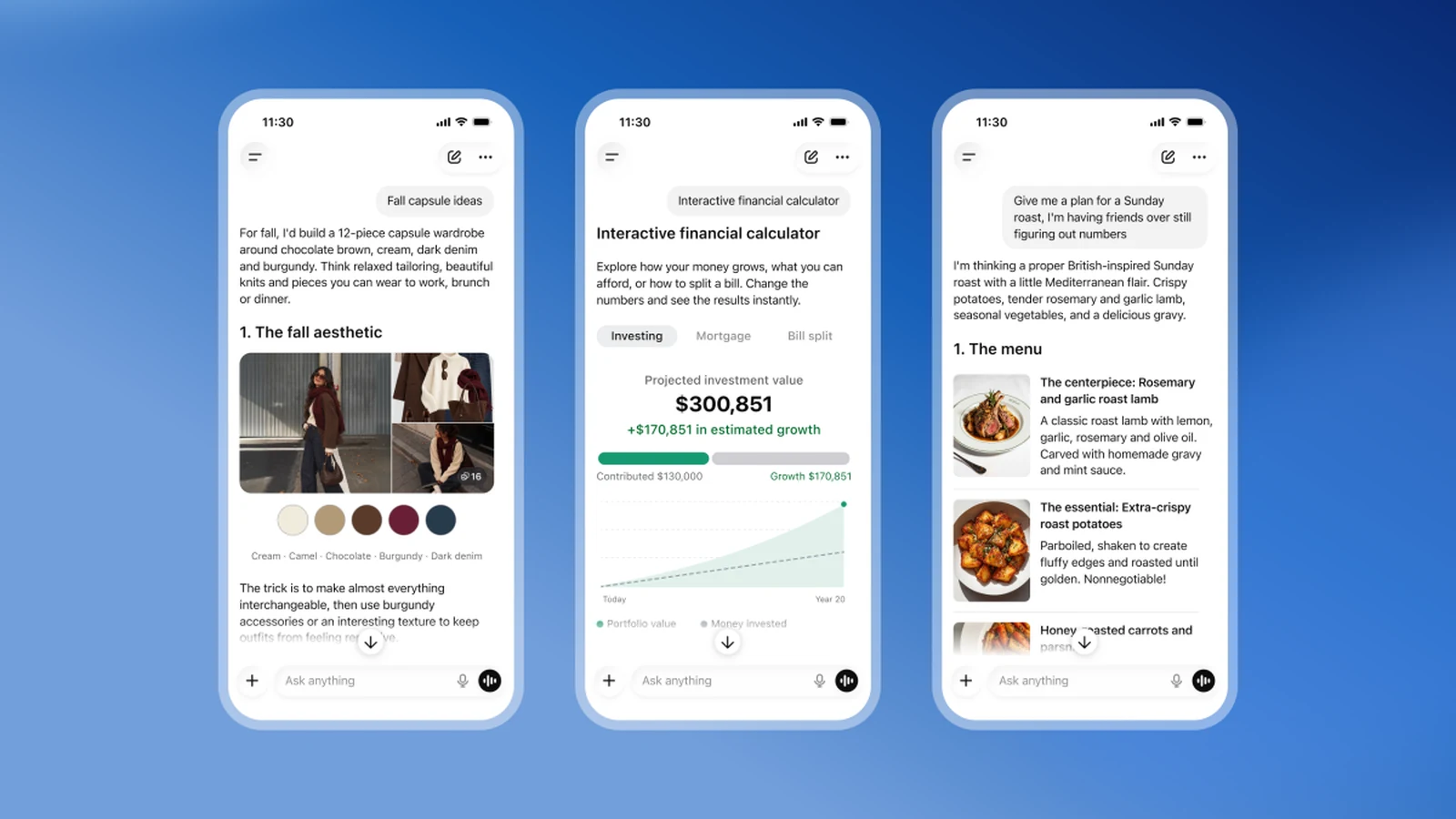
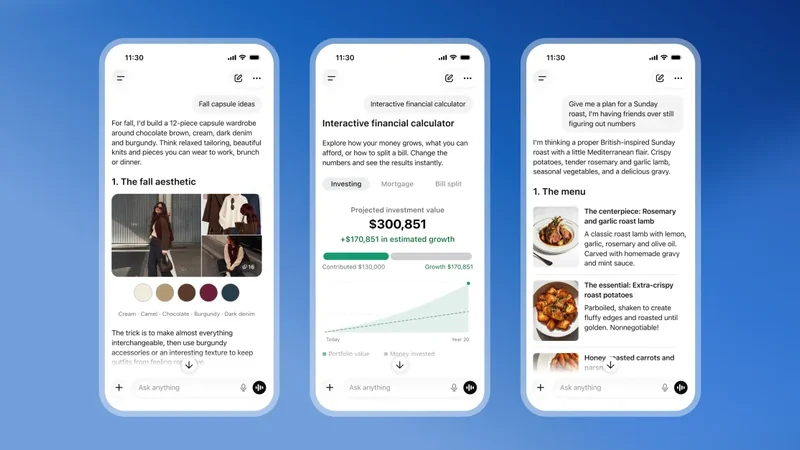
OpenAI is making its flagship chatbot significantly more visual with the launch of a new interface feature known as Intelligent UI. Rolling out alongside a brand new GPT-6 model, the updated interface integrates a substantial amount of interactive visuals directly into ongoing user conversations.
Rather than relying strictly on text-based responses or flat, cartoonish pictures, the newly enhanced chatbot will frequently incorporate dynamic elements that users can work with directly. According to the company, these elements include tappable buttons, customized calculators designed for specific tasks, interactive charts, and editable graphs.
The primary goal behind this interface redesign is to make learning complex topics much easier for users of all backgrounds. While the company did not state it directly, the more dynamic layout could also make the platform friendlier, more accessible, and capable of attracting a wider audience globally.
Demonstrating Interactive Visual Capabilities
During a briefing call with journalists, staff members provided a live demonstration of what Intelligent UI can accomplish. The presentation showed how the system can instantly generate various diagrams and graphical elements designed to help people understand abstract, complicated concepts much faster.
Aarush Selvan, a product manager at OpenAI, explained the core philosophy behind the shift during the demonstration. He noted that while ChatGPT has historically functioned predominantly as a text-based interface, the team wanted to ensure that users trying to accomplish everyday objectives—such as planning a recipe, organizing a trip, or learning a new subject—receive the most helpful answers possible.
To illustrate the practical application, Selvan shared a scenario involving a college student seeking to understand the mechanics of an airplane wing. When asked how an airplane wing generates lift, the system quickly spun up a series of diagrams clearly demonstrating how planes stay aloft.
Everyday Use Cases and Practical Examples
The potential applications span a wide variety of daily tasks and educational scenarios. Company examples highlighted during the rollout included tailored visuals for recipes, clear diagrams detailing bicycle mechanics, and interactive maps built for multi-day hiking excursions.
Other practical tools demonstrated by the team included a personal savings calculator and specialized interactive layouts for niche tasks. These additions are designed to give users functional instruments within the chat window rather than passive descriptions.
By offering specialized visual utilities on demand, the platform bridges the gap between conversational text responses and dedicated software tools, streamlining workflows for both casual users and professionals alike.
Customization and Global Rollout Schedule
Understanding that every user has different preferences, OpenAI has built customization options directly into the new interface. Similar to adjusting other aspects of the chatbot's personality and behavior, individuals who prefer fewer graphics in their responses will have the option to dial back the visual elements.
The rollout schedule varies depending on subscription tiers. Intelligent UI launches globally alongside GPT-6 for Pro, Plus, Business, and Enterprise accounts. Users on the free tier and lower-cost Go tiers will receive access to the new capabilities shortly after.
This tiered rollout ensures infrastructure stability while bringing the visual interface to millions of users worldwide as OpenAI continues to expand the boundaries of generative AI systems.
Sources
- TechCrunchChatGPT is getting a lot more visual, with the launch of a new interface
Continue chronologically

Related entity coverage
Related stories
OpenAI rolls out GPT-6 with Intelligent UI to ChatGPT
OpenAI launches GPT-6 globally in ChatGPT, introducing Intelligent UI for interactive responses and faster answers. Read the official announcement.
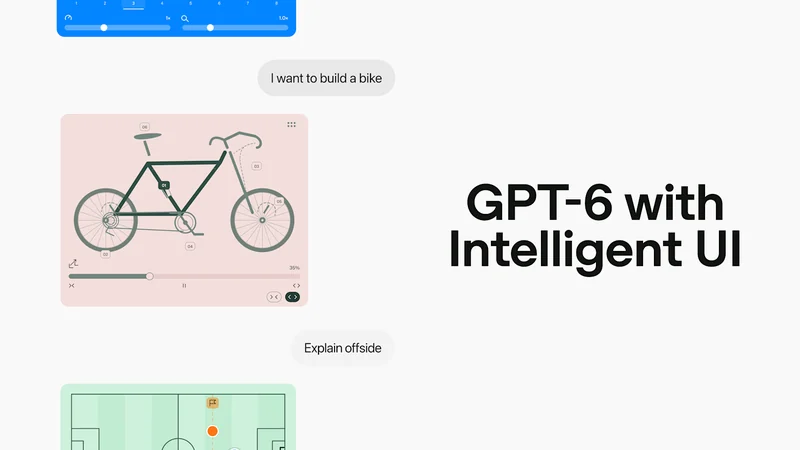
OpenAI Rolls Out GPT-6 to All Tiers of ChatGPT
OpenAI is rolling out GPT-6 to all ChatGPT tiers, bringing a new Intelligent UI capability that delivers interactive visual responses and faster answers.
OpenAI Launches ChatGPT Intelligent UI Update with GPT-6
OpenAI is rolling out a new Intelligent UI feature for ChatGPT powered by GPT-6, adding interactive charts, diagrams, forms, and buttons to responses.
Cloudflare and OpenAI Share Results from AI Discovery Research Pilot
Cloudflare and OpenAI share early results from their joint research pilot, revealing how network signals help ChatGPT discover new web content efficiently.