ChatGPT Deepens Chrome Integration With Tab Control
OpenAI is expanding ChatGPT’s integration with Google Chrome, giving the assistant access to open-tab context and limited control over browser tasks. The updated extension also adds a sidebar interface for using ChatGPT alongside web pages.
 Radwan AbdulhadiEditor and technology writer
OpenAI expands ChatGPT’s Chrome role
OpenAI this week announced a deeper integration between ChatGPT and Google Chrome, extending the role of the AI assistant beyond a separate chat window. Through an updated browser extension, ChatGPT can inspect the user’s open tabs and use the information found there when answering questions or carrying out tasks. The announcement was described in a thread on Twitter/X, where OpenAI presented the changes as a way to make browsing-related work more directly accessible from ChatGPT.
The central change is the assistant’s ability to work with the context of multiple open tabs. Users can ask ChatGPT questions about those pages rather than manually copying details into a conversation. The source examples frame this as a research and comparison tool: a person could ask ChatGPT to compare several products, review pricing pages against a set of requirements, or summarize an article in plain English while the relevant pages remain open in Chrome.
Tab control adds action-oriented workflows
OpenAI says ChatGPT can also control Chrome tabs to get things done. The capabilities described include sending messages, filling out forms, downloading files, and organizing or grouping a user’s open tabs. That moves the extension from simply reading browser context toward performing actions inside the browser, although the announcement’s examples do not define a broader list of supported websites or services.
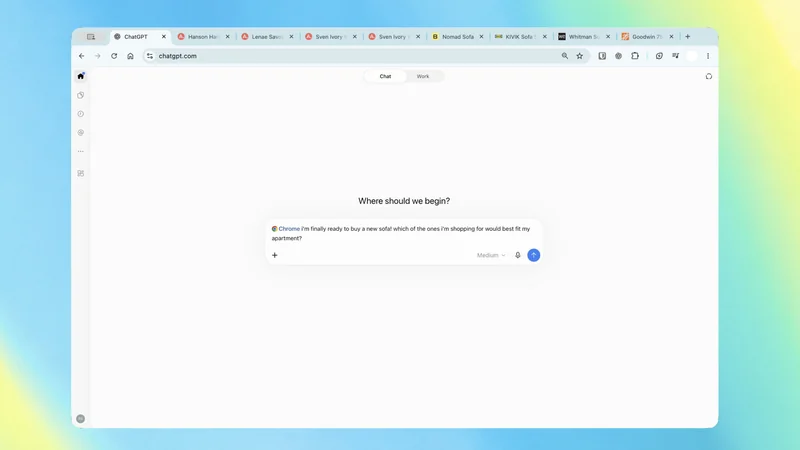
Several demonstrations illustrate how the feature is intended to be used. ChatGPT can compare couches across dimensions such as material, delivery time, and return policy, or place vendors from open tabs into a comparison sheet with pricing, key features, and source links. Another example asks the assistant to compare contractor services and draft an email to the option that best fits a home renovation. These workflows combine information gathering with preparation of a next step, rather than requiring the user to move details between tabs manually.
The extension brings ChatGPT into the browser
The updated experience includes a sidebar that lets users access ChatGPT within Chrome. The sidebar interface is similar to the way Chrome presents its built-in Gemini integration, according to the source. That positioning gives the assistant a persistent place beside the pages being reviewed, making it possible to ask questions or request actions without leaving the browsing session.
The change is delivered through the ChatGPT extension for Google Chrome, which is now available in the Chrome Web Store. The extension’s listing provides the installation point for users who want to try the updated browser integration. The announcement does not state that every workflow is available on every website, nor does it provide additional limits for actions such as messaging, form completion, file downloads, or tab organization.
Examples focus on research and preparation
The examples shared by OpenAI emphasize tasks where information is distributed across several pages. Users can ask ChatGPT to explain the main argument of an article and identify the evidence supporting it, or compare pricing pages with their own requirements to determine which plan includes the needed features. In both cases, the assistant is presented as using the pages already open in the browser as its working context.
The demonstrations also show a distinction between preparing an action and completing it. One prompt asks ChatGPT to use an event brief to fill out a registration form and stop before submitting. Another asks it to fill out a form ahead of a dentist visit and add the appointment to work and personal calendars. The source presents these as examples of the integration in action, but does not provide further details about confirmation steps, supported calendar services, or how permissions are handled.
A broader browser-assistant competition
By adding tab awareness and browser controls, ChatGPT is moving closer to the kind of embedded assistant experience already associated with Chrome’s Gemini integration. The sidebar and multi-tab workflows place the assistant alongside the user’s browsing activity, rather than treating the browser as only a destination for links returned from a chat.
The announcement comes as OpenAI continues developing ways for ChatGPT to handle practical tasks, but the supplied source does not announce a separate product, pricing tier, rollout schedule, or new model. It specifically describes improvements to the Chrome extension and points users to its Web Store availability. The extent of the integration therefore remains defined by the workflows and demonstrations OpenAI has shared: using open-tab information, taking selected browser actions, and helping organize the pages that are already open.
Sources
- 9to5GoogleChatGPT gets deeper Google Chrome integration including control over tabs
Continue chronologically


Related entity coverage
Related stories
OpenAI Updates ChatGPT Chrome Extension With Tab Viewing and Sidebar Integration
OpenAI has updated its ChatGPT Chrome extension to analyze open browser tabs, manage multi-step workflows, and integrate conversation history into a sidebar.
OpenAI Details the Evolution of Its AI Assistant, Dots
OpenAI executive Alexander Embiricos explains how the company evolved its coding tools into dots, its always-on AI personal assistant.
OpenAI and Oracle Expand Partnership to Bring Apps to ChatGPT
OpenAI and Oracle expand their commercial partnership to integrate business applications and AI agents into ChatGPT and power new Oracle offerings.

OpenAI Releases Signals Data on Global ChatGPT Work Use
OpenAI Economic Research has released new data covering 165 work activities across nearly 100 countries, mapping how people use ChatGPT for work.