Microsoft Teams Highlights Four Key Tools for Users
Microsoft Teams offers a variety of functions beyond standard messaging and video calls to help users navigate daily communications.
 Radwan AbdulhadiEditor and technology writer
Introduction to Teams Features
Although many people use [Microsoft Teams] every day for work, the platform regularly updates with functions that might slip by unnoticed. With more than 320 million monthly active users, the service offers a variety of tools beyond basic messaging and video calls. As remote work adoption continues, features designed to keep meetings running on time or locate unfinished messages can help make the daily experience smoother.
Meeting Countdown Timer
Managing meeting times can be challenging when multiple speakers are scheduled. To address this, a countdown timer was rolled out for [Microsoft Teams] meetings. Users can select More in the top toolbar and choose Timer to pull up a countdown in the top left corner of the meeting window. The timer can be set for up to 100 minutes and is visible to all attendees with presenter capabilities.
Once set, the timer can be modified or canceled as needed. The feature turns red as the end of time approaches and flashes when time is up. However, it functions exclusively for scheduled meetings and does not apply to live events, webinars, or spontaneous calls.
Voice Isolation for Background Noise
Taking a meeting without the benefit of a quiet space can introduce unwanted audio distractions. [Microsoft Teams] addresses this by offering a voice isolation feature that utilizes artificial intelligence to reduce background noise while speaking.
To use voice isolation, individuals must first create a voice profile by navigating to settings through the three dots in the toolbar, selecting Recognition, and clicking Create a voice profile. After reading a short paragraph during voice capture, users can toggle voice isolation on or off via the dropdown next to the microphone button during a call.
Live Transcription Capabilities
Catching up on missed information during a call is possible through the platform's live transcription feature. First rolled out in 2021, [Microsoft] notes that the feature operates in near real time and remains accessible after the meeting concludes.
The tool can differentiate between multiple speakers, functioning similarly to other modern transcription models. When enabled by an organizer or presenter under the toolbar's three dots menu, meeting participants receive a notification. Participants who prefer not to be identified can turn off speaker attribution within their settings.
Locating Unsent Drafts
Getting interrupted while writing a message can make it difficult to remember who the intended recipient was. Introduced in March 2026, [Microsoft Teams] added a dedicated space on the left chat panel to access unsent drafts.
This functionality displays a list of messages that were started but left unsent. Users can either discard the draft or navigate directly back to the original conversation to resume typing without needing to hunt for the message or start over.
Sources
- Engadget4 important features you should know if you use Microsoft Teams
Continue chronologically

Related entity coverage
Related stories
Microsoft Teams to add deepfake detection support
Microsoft Teams will support third-party deepfake detection tools and add impersonation warnings for meetings, with both features due in November.
Microsoft Teams to Get AI-Powered Phishing Detection
Microsoft Teams will introduce AI-powered, context-aware phishing detection starting in early November 2026 to target deceptive intent.

GitHub Copilot Updates for Slack and Microsoft Teams
GitHub introduces updates for GitHub Copilot in Slack and Microsoft Teams, bringing enhanced context, model switching, and workflow tracking.
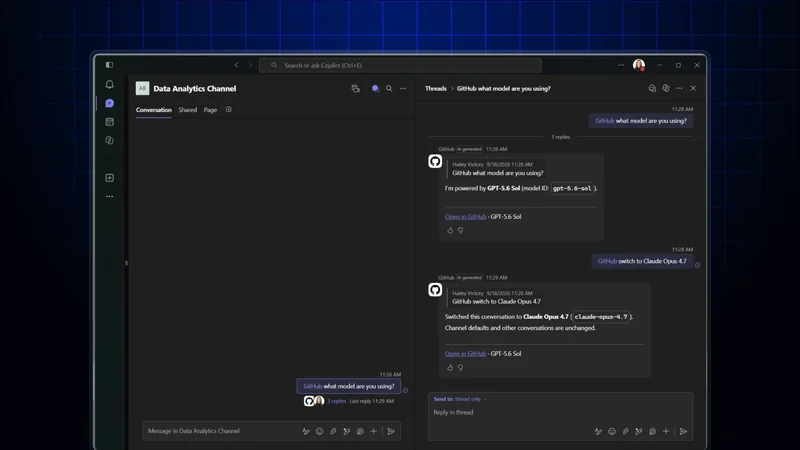
GitHub Copilot in Slack and Teams Adds Multi-Repo Support
GitHub Copilot in Slack and Microsoft Teams now features multi-repo support, more natural conversations, better context handling, and enhanced reliability.