Kali Linux 2026.3 Released With New Tools and KDE Plasma 6.7
The third Kali Linux release of the year introduces six new hacking tools, a kernel upgrade to version 7.1.5, desktop environment updates, and refreshed build scripts.
 Radwan AbdulhadiEditor and technology writer

Overview of Kali Linux 2026.3
Kali Linux has officially released version 2026.3, marking the third update for the Linux distribution this year. The latest version brings a series of updates designed for ethical hackers, penetration testers, red-teaming professionals, and network researchers who utilize the platform for security assessments and network research.
As an installable operating system or live environment, the distribution supports a wide array of hardware platforms, ranging from standard computers to Raspberry Pi devices and Android phones via Kali NetHunter. Details on acquiring the operating system can be found when you select a platform on the official distribution website.
New Hacking Tools and Package Updates
In this release, the development team has updated 126 packages, incorporated new libraries, and upgraded the system kernel from version 6.19 to 7.1.5. Additionally, six new hacking tools have been integrated into the repository to expand security assessment capabilities.
The newly added tools include dalfox, a powerful open-source XSS scanner and utility focused on automation, alongside katana, which serves as a next-generation crawling and spidering framework for web assessments.
Other additions feature qsreplace for handling URLs on standard input and replacing query string values, sdrangel as a Qt-based software-defined radio front-end, and snaffler-ng designed as an SMB share credential and sensitive data scanner.
Desktop Environment and KDE Plasma 6.7 Enhancements
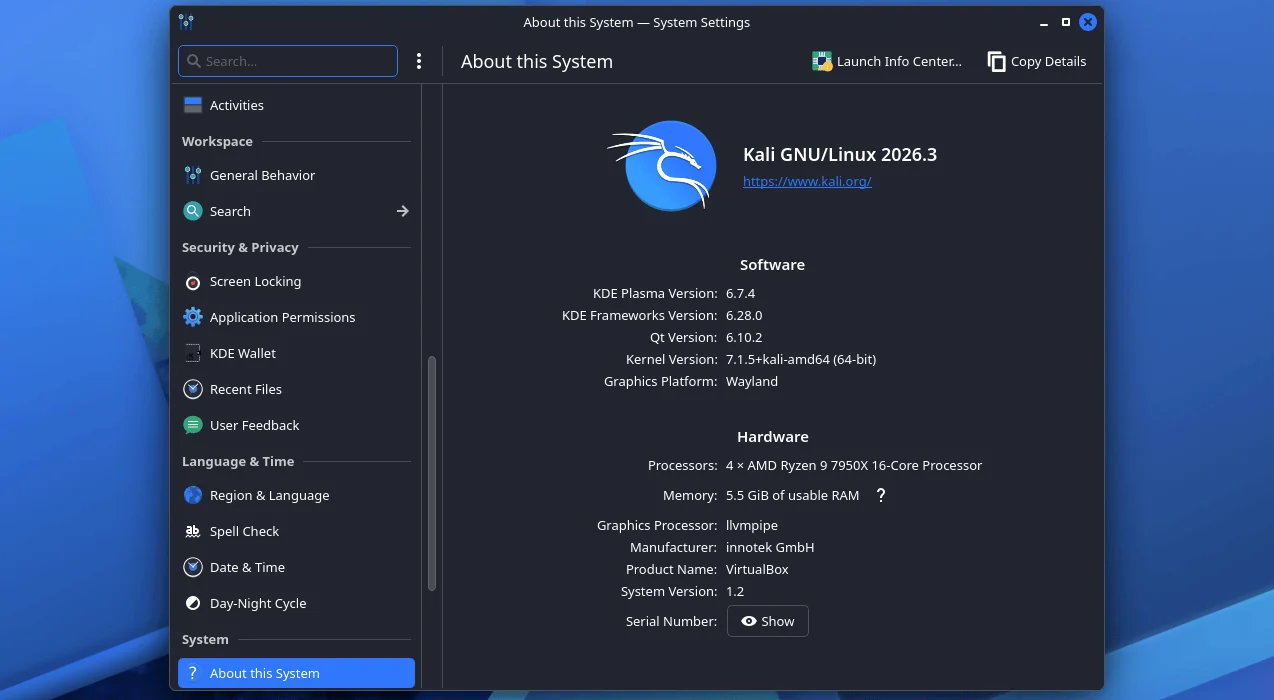
Kali Linux 2026.3 introduces notable desktop environment updates, prominently featuring KDE Plasma 6.7 alongside new system icons. The updated desktop environment delivers performance enhancements, workflow optimizations, and integrated Intel GPU power-usage improvements.
Additional workflow enhancements include per-screen virtual desktops, which enable users to establish separate workspaces on the same desktop environment for applications like web browsers, terminals, and documentation.
According to the Kali devs explained update notes, navigating between virtual desktops has been accelerated from the Overview interface. Furthermore, extended support for additional Wayland protocols and portals continues to refine the user experience on modern Linux configurations.
The latest desktop updates also allow network connections to be duplicated to save time when working with multiple similar network configurations, while the System Monitor application has received additional functional refinements.
Refreshed Build Scripts and Container Support
The release refreshes the build scripts utilized for generating official Kali distribution images, bringing greater consistency across supported platforms. Each script now maintains uniform features, command-line arguments, structural layouts, and a consistent look and feel where possible.
For users preferring containerized environments, the updated build scripts now offer support for both Docker and Podman containers. Each refreshed script includes a built-in container script that automatically detects the available container engine, establishes the build container, and executes the build process internally.
While not every build script was completely refreshed prior to the initial rollout of version 2026.3, the project aims to complete the remaining scripts by Kali 2026.4, with subsequent stages focusing on further automation of builds and operational workflows.
Upgrading and Availability
Users can adopt the new version by upgrading their current installations, selecting an alternative distribution platform, or choosing to directly download ISO images for fresh installations and live distribution deployment.
For installations operating via the Windows Subsystem for Linux, upgrading to WSL 2 is recommended to ensure improved support for graphical applications. Users can verify their operational system version by executing configuration queries within their command prompt environment, and verify upgrade success through specific operating system release checks.
Sources
- BleepingComputerKali Linux 2026.3 released with 7 new tools, desktop updates
Continue chronologically


Related stories
Kali Linux 2026.3 Released With Six New Tools and KDE Plasma 6.7
Kali Linux 2026.3 is now available with six new hacking tools, an upgraded Linux kernel, KDE Plasma 6.7 desktop updates, and container build support.
Microsoft October 2026 Patch Tuesday fixes 1,411 flaws
Microsoft's October 2026 Patch Tuesday addresses a record-breaking 1,411 flaws, featuring three zero-day vulnerabilities and new risk cohorts.
Germany Arrests Alleged Core Qilin Ransomware Member
Germany has arrested a Russian national suspected of being a leading member of the Qilin ransomware group following an extradition from Japan.

ASOS Confirms Cyberattack After Rogue In-App Notifications
British online retailer ASOS confirms a data breach following unauthorized push notifications sent to users via a compromised third-party platform.