GitHub Copilot Weekly Releases Bring New Features and Controls
The latest weekly updates to GitHub Copilot introduce expanded model options, enhanced security controls, and improved workspace management features.
 Radwan AbdulhadiEditor and technology writer
Introduction to the October 5 Weekly Releases
The latest set of updates for GitHub Copilot focuses heavily on making the tool easier to use across different accounts and environments while simultaneously providing developers with greater control over what artificial intelligence agents can access and how their work is managed.
Detailed information about these rollouts can be found directly through the official [GitHub Changelog](https://github.blog/changelog/2026-10-09-github-copilot-weekly-releases-october-5/), which outlines the expansive ecosystem changes arriving this week for developers worldwide.
These updates are designed to streamline development workflows, improve security postures across various enterprise environments, and expand the flexibility of AI-assisted coding tools without adding undue complexity to everyday tasks.
Integration of Claude Haiku 5.5
A major highlight of this week's deployment is the arrival of new model options designed to cater to diverse developer preferences and performance requirements across various organizational tiers.
Specifically, [Claude Haiku 5.5 in GitHub Copilot](https://github.blog/changelog/2026-10-07-claude-haiku-5-5-in-github-copilot) is now officially available to users subscribed to Copilot Pro, Pro+, Max, Business, and Enterprise plans.
This addition gives developers more versatility when choosing which underlying artificial intelligence model powers their coding assistance, allowing them to balance speed, cost, and contextual reasoning according to their specific project requirements.
Enhanced Security with Local Sandboxing
Security remains a core priority for development teams leveraging automated agents and LLMs within sensitive codebases and proprietary enterprise infrastructure architectures.
To address these concerns, [local sandboxing](https://docs.github.com/copilot/concepts/security-governance-and-network-settings/about-cloud-and-local-sandboxes) is now generally available across the Copilot CLI, the Copilot app, and VS Code sessions utilizing Agent Host.
This security feature allows developers to strictly limit agents' access to critical files, local networks, and sensitive credentials. Best of all for development teams, this capability is included with Copilot at no extra cost, providing robust governance right out of the box.
Account Management and the Copilot App
Managing multiple client projects, open-source contributions, and enterprise environments can often create authentication headaches when developers must switch between distinct organizational credentials.
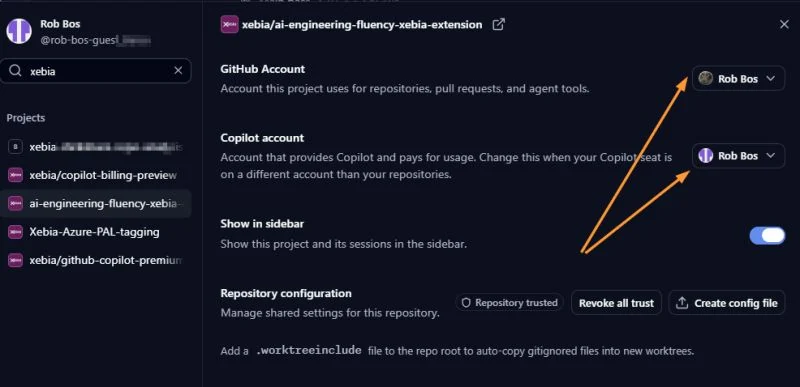
To alleviate this friction, the updated [Copilot app](https://github.com/features/ai/github-app?utm_source=download-app-09-07&utm_medium=changelog&utm_campaign=weekly-copilot-launches-aug-2026) now empowers users to utilize separate GitHub accounts for their Copilot license and their target repositories.
For instance, a developer can easily leverage an enterprise-provided Copilot license while simultaneously accessing and modifying repositories through an entirely separate personal or client-specific GitHub account.
Local Models and CLI Flexibility
The command-line interface continues to receive powerful enhancements aimed at supporting developers who prefer local development stacks alongside cloud-connected solutions.
Developers can now [Discover local models in GitHub Copilot CLI](https://github.blog/changelog/2026-10-07-discover-local-models-in-github-copilot-cli/) to seamlessly select local models without ever having to leave their existing terminal workflow environment.
By utilizing the simple `/model` command, users can effortlessly discover supported models from a running local Ollama instance. These local options appear right alongside manually configured models and cloud-based models provided directly by GitHub Copilot.
Workspace Management and VS Code Improvements
Handling multiple background AI tasks and keeping development environments clean can consume significant system resources over long coding sessions.
The latest updates introduce the ability to view agent sessions side by side directly within the Agents window. Developers can easily arrange these sessions in a grid layout to conveniently compare different results or track multiple concurrent tasks.
Additionally, developers can now free up valuable disk space by utilizing the new “Open worktree cleanup” feature inside chat. This utility displays exactly how much storage space inactive session worktrees are consuming, allowing users to choose precisely which ones to remove.
To review the full spectrum of integrated enhancements, users can consult the [full VS Code release notes](https://code.visualstudio.com/updates/v1_141) to explore every new feature and bug fix deployed this week.
Sources
- GitHub ChangelogGitHub Copilot weekly releases — October 5
Continue chronologically


Related entity coverage
Related stories
GitHub Copilot CLI Adds Local Model Discovery Support
GitHub Copilot CLI version 1.0.94-0 introduces local model discovery, letting developers choose supported models directly from their workflows.
GitHub Adds User Attribution and Telemetry Controls
Enterprise administrators can now attribute GitHub Copilot activity to specific users and configure fine-grained telemetry capture settings.
GitHub Adds BYOK Support to Copilot Usage API
GitHub updates its Copilot usage metrics API to separate bring-your-own-key usage and enterprise custom models from Copilot-hosted data.
GitHub Announces Upcoming Deprecation of Selected Copilot Models
GitHub has announced the upcoming deprecation of selected Copilot models across all experiences, scheduled to take place on November 16, 2026.