
GitHub Adds In-Product Validator for Copilot Enterprise Settings
GitHub has released a new in-product validator for enterprise managed settings in GitHub Copilot. This tool allows administrators to identify and correct configuration errors directly within the platform, ensuring that AI policies are enforced as intended.
 Radwan AbdulhadiEditor and technology writer
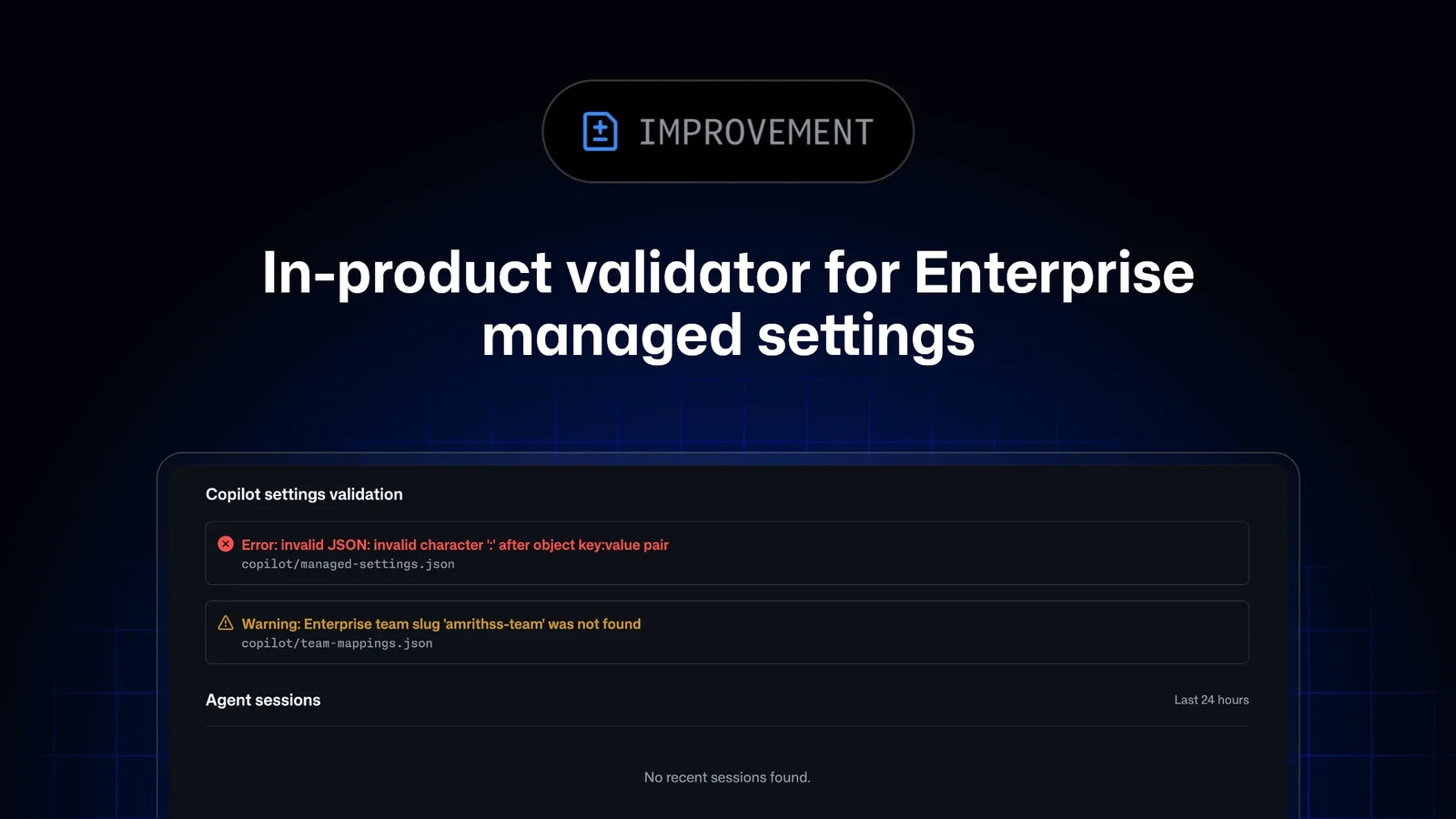
Introduction of the In-Product Validator
GitHub has introduced a significant update to its enterprise management tools by launching an in-product validator for enterprise managed settings for GitHub Copilot. This new feature is designed to address common configuration challenges that enterprise administrators face when deploying AI policies across their organizations. By integrating validation directly into the product interface, GitHub aims to streamline the setup process and reduce the likelihood of misconfigurations that could hinder the effective use of Copilot.
The validator serves as a critical quality control mechanism for organizations relying on GitHub Copilot for their development workflows. Previously, errors in managed settings could go undetected until they caused policy enforcement failures, leading to potential security or compliance issues. With this update, administrators can proactively identify and resolve these problems before they impact the broader user base, ensuring a smoother and more secure deployment of AI capabilities.
Error Detection Capabilities
The core functionality of the new validator lies in its ability to detect a wide range of configuration errors. Specifically, the tool identifies malformed JSON, which is a frequent source of issues when manually editing configuration files. Additionally, it flags unsupported configurations that may not be compatible with the current version of GitHub Copilot or the enterprise environment. This comprehensive detection capability helps administrators maintain the integrity of their AI controls.
Beyond basic syntax errors, the validator also checks for invalid team mappings. Team mappings are crucial for defining which users or groups have access to specific Copilot features or policies. If these mappings are incorrect, it can lead to unauthorized access or restricted functionality for legitimate users. By detecting these invalid mappings, the validator ensures that access controls are accurately applied, aligning with the organization's security and compliance requirements.
User Interface and Workflow
Administrators can access the validation results through the 'Copilot settings validation' section of the enterprise AI controls page. This dedicated section provides a clear and organized view of any detected issues, making it easy for users to understand the nature of each error. The interface is designed to be user-friendly, allowing even non-technical administrators to navigate and address configuration problems with minimal effort.
Each issue identified by the validator includes specific details about the affected file and the JSON path where the error occurs. This level of granularity is essential for efficient troubleshooting, as it directs administrators to the exact location of the problem within their configuration files. By providing precise error locations, the validator reduces the time spent diagnosing issues and allows for quicker resolution, ultimately improving the overall efficiency of the enterprise management process.
Configuration Files and Updates
The validator primarily focuses on the copilot/team-mappings.json file and any team settings files referenced by the team mappings file. These files are central to defining how Copilot is configured for different teams within an organization. By concentrating on these key files, the validator ensures that the most critical aspects of the enterprise setup are thoroughly checked for errors. This targeted approach helps maintain the consistency and reliability of the Copilot deployment across the organization.
Once an issue is identified, administrators are required to correct the error in the relevant configuration file. After making the necessary changes, the update must be committed to the default branch of the .github-private repository. This step is crucial for ensuring that the corrected configuration is applied to the enterprise environment. Committing changes to the default branch follows standard version control practices, providing a clear audit trail and facilitating collaboration among team members involved in managing the Copilot setup.
Verification and Best Practices
After committing the changes, administrators should reload the Agents page to review the validator results. This step confirms that the configuration is now valid and that all errors have been successfully resolved. Regularly checking the validator results is recommended as a best practice to ensure that the enterprise managed settings remain compliant and functional. This proactive approach helps prevent potential issues from arising due to configuration drift or new errors introduced during updates.
For those seeking further guidance on managing enterprise client settings, GitHub provides comprehensive documentation. The documentation offers detailed instructions and examples to help administrators configure and validate their Copilot settings effectively. By leveraging these resources, organizations can maximize the benefits of GitHub Copilot while maintaining strict control over their AI policies and data security. This support ecosystem is integral to the successful adoption and management of enterprise AI tools.
Broader Context and Impact
The introduction of the in-product validator is part of GitHub's ongoing efforts to enhance its enterprise management tools. By providing more robust and user-friendly features, GitHub aims to make it easier for organizations to adopt and manage AI technologies like Copilot. This update reflects a broader trend in the tech industry towards simplifying complex administrative tasks and improving the overall user experience for enterprise customers.
As organizations increasingly rely on AI to drive productivity and innovation, the importance of reliable and secure configuration management cannot be overstated. The new validator addresses a critical need in this area, providing administrators with the tools they need to ensure that their AI policies are implemented correctly. This feature is likely to be welcomed by IT leaders and security teams who are responsible for overseeing the deployment and management of AI tools within their organizations.
Sources
- GitHub ChangelogEnterprise managed settings in-product validator