
GitHub Adds Feature Engagement to Copilot Dashboard
GitHub has expanded the Copilot impact dashboard with feature-level engagement data for active users. The same 28-day breakdown is now available through enterprise and organization report APIs.
 Radwan AbdulhadiEditor and technology writer
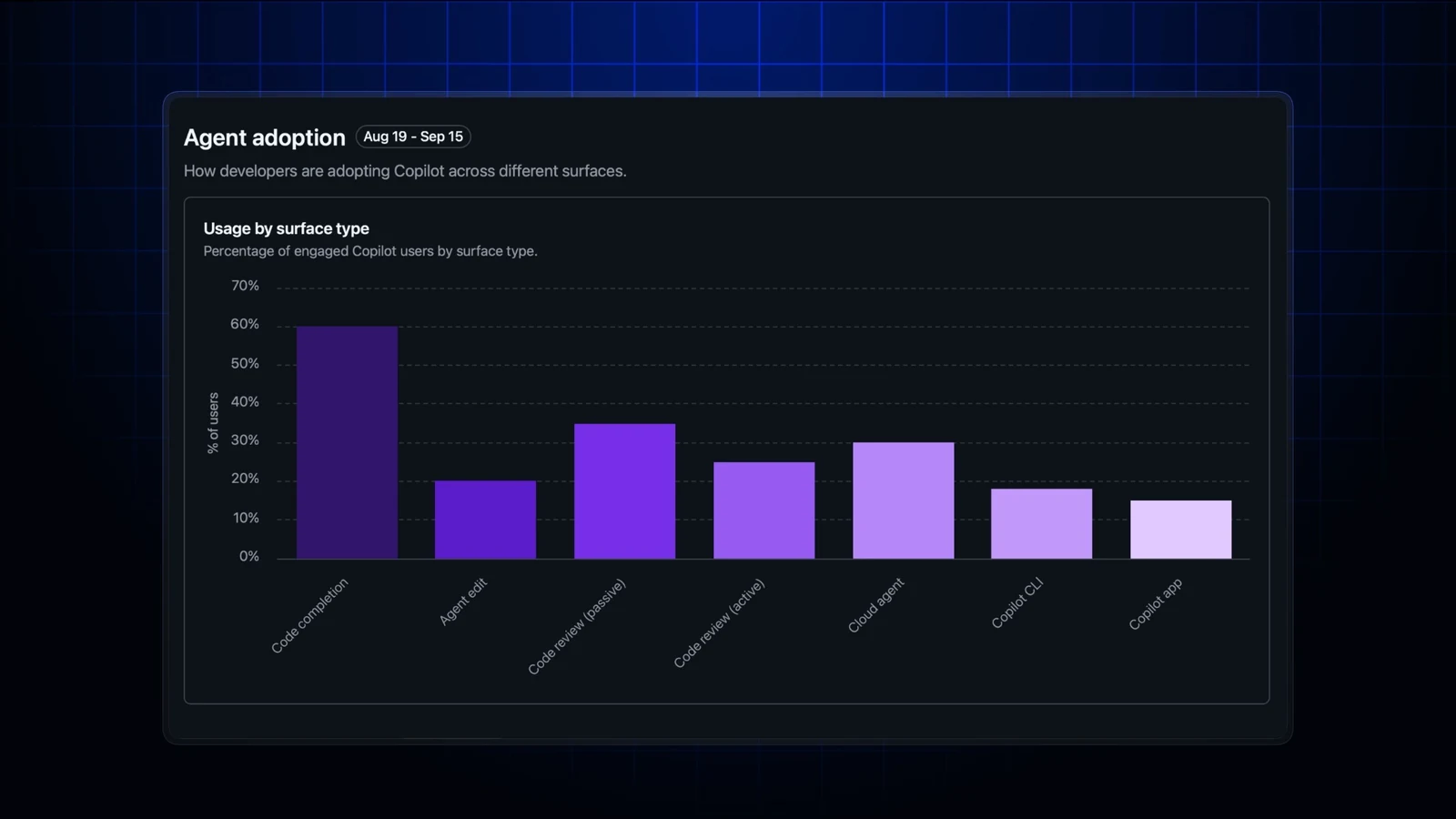
Feature use moves into view
GitHub’s Copilot impact dashboard now shows how many active users regularly engage with key Copilot features. The update gives enterprise administrators a more detailed view of which experiences are becoming part of developers’ workflows and which may require additional enablement.
The dashboard measures feature engagement across a rolling 28-day period. A user is counted for an included feature when they engaged with it on at least two days during that period, rather than simply using it once. GitHub presents the change as a way for enterprise leaders to identify adoption patterns and focus training or configuration changes where usage is lower.
Breakdown across Copilot experiences
The new reporting covers several Copilot capabilities. Engagement is separated into code completion, agent edit, passive Copilot code review, active Copilot code review, Copilot cloud agent, Copilot CLI, and Copilot app.
GitHub distinguishes the two code review categories by how the review begins. Active Copilot code review refers to a user manually requesting a Copilot review or applying a Copilot review suggestion. Passive Copilot code review refers to Copilot being automatically assigned to review a user’s pull request without that user actively engaging with the review.
A user can be counted under more than one feature, so the feature totals are not intended to represent mutually exclusive groups. The engagement information is available in enterprise and organization 28-day aggregate reports, rather than in user-level reports.
New API field for aggregate reports
Enterprise and organization report APIs now include the dashboard’s active-user total and feature counts through the copilot_feature_engagement object. Within that object, totals_by_feature provides the breakdown for the listed Copilot experiences.
The object can be absent or null when the calculation is unavailable. GitHub also notes that the metrics are aggregate counts and do not identify individual users, limiting the reporting to adoption analysis at the enterprise or organization level.
Expanded AI adoption phase reporting
The update also changes how AI adoption phases are represented in reports. The users_in_phase_28d field now reports the full rolling 28-day population classified into each adoption phase as of each report day.
This supplements the existing total_engaged_users field, which continues to report only users in the relevant phase who were active on that specific day. GitHub says the earlier phase breakdowns showed only that daily active population, while the expanded reporting adds the broader rolling 28-day view.
The two fields answer different questions: total_engaged_users reflects activity on the report day, while users_in_phase_28d reflects the measured population across the preceding 28-day window. users_in_phase_28d is omitted when the phase population was not measured. A value of zero means the phase was measured and had no users.
Access depends on reporting permissions
The feature engagement data is available to enterprise owners and billing managers, organization owners, and users with a custom organization or enterprise role that grants the View Copilot Metrics permission. The Copilot usage metrics policy must also be enabled.
Because the reports are aggregate, the new fields are designed to show adoption levels without identifying individual users. GitHub directs administrators to its Copilot usage metrics API documentation for implementation details and access guidance.
A broader view of Copilot adoption
By adding feature-level engagement to the dashboard and related APIs, GitHub gives administrators a way to compare regular use across different Copilot experiences instead of viewing adoption only as a single overall measure. The 28-day threshold emphasizes recurring usage and can help distinguish established workflows from occasional activity.
The accompanying adoption-phase change provides another layer of context. Administrators can now compare daily engagement with the larger rolling population assigned to each phase, while retaining the existing daily active-user measure. Together, the additions provide aggregate reporting for assessing where Copilot usage is established and where further enablement may be needed.
Sources
- GitHub ChangelogCopilot impact dashboard now shows feature engagement